
·您现在的位置: 江北区云翼计算机软件开发服务部 >> 文章中心 >> 网站建设 >> app软件开发 >> IOS开发 >> 多线程开发之一NSThread
- iOS定位(一)地图定位
- IOSTableView实现省市联动
- IOSXib使用——Xib表示局部界面
- iOS开发之CocoaPods的安装与使用
- 【读书笔记】iOS网络-同步请求,队列式异步请求,异步请求的区别
- iOS开发-代码片段(CodeSnippets)提高开发效率
- 从C#到Objective-C,循序渐进学习苹果开发(1)--准备开发账号和开发环境
- CocoaDesignPatterns
- iOS-指压即达,如何集成iOS9里的3DTouch
- IOS开发实战-----Tom猫
- [iOS]MVVM-框架介绍
- IOS开发笔记整理49之详解定位CLLocation
- OC细节-1.深拷贝与浅拷贝详解
- iOS:等比压缩截图代码
- 【学习笔记】【C语言】进制
- iOS64位编程
- 使用到定时器,单例和协议的一个小应用(2)
- iOS中的屏幕适配之Autolayout(初级)
- 深入浅析IOS中UIControl
- iOS通过多种方式创建控制器
- iPhone4到iPhone6的设计、制造工艺历程浅析
- iOS应用开发中AFNetworking库的常用HTTP操作方法小结
- //视图跟着键盘推出一起动
- 我的iOS-App
- iOS网络编程
- 关于iOSAPP中网络层的设计
- 从零开始学ios开发(九):SwappingViews
- ios图片水印(代码)
- iOSReact-Native入门指南之HelloWorld
- Objective-CMemoryManagementBeingExceptional异常处理与内存
多线程开发之一NSThread
每个 iOS 应用程序都有个专门用来更新显示 UI 界面、处理用户的触摸事件的主线程,因此不能将其他太耗时的操作放在主线程中执行,不然会造成主线程堵塞(出现卡机现象),带来不好的用户体验。
一般的解决方案就是:将那些耗时的操作放到另外一个线程中去执行,多线程编程就是防止主线程堵塞和增加运行效率的最佳方法。
iOS 支持多个层次的多线程编程,层次越高的抽象程度越高,使用也越方便,也是 Apple 最推荐使用的方法。
下面根据抽象层次从低到高依次列出 iOS 所支持的多线程编程方法:
-
NSThread :是三种方法里面相对轻量级的,但需要管理线程的生命周期、同步、加锁问题,这会导致一定的性能开销
-
NSOperation:是基于 OC 实现的,NSOperation 以面向对象的方式封装了需要执行的操作,不必关心线程管理、同步等问题。
NSOperation 是一个抽象基类,iOS 提供了两种默认实现:NSInvocationOperation 和 NSBlockOperation,当然也可以自定义 NSOperation
-
Grand Central Dispatch(简称 GCD ,iOS4 才开始支持):提供了一些新特性、运行库来支持多核并行编程,他的关注点更高:如何在多个 CPU 上提升效率
效果如下:
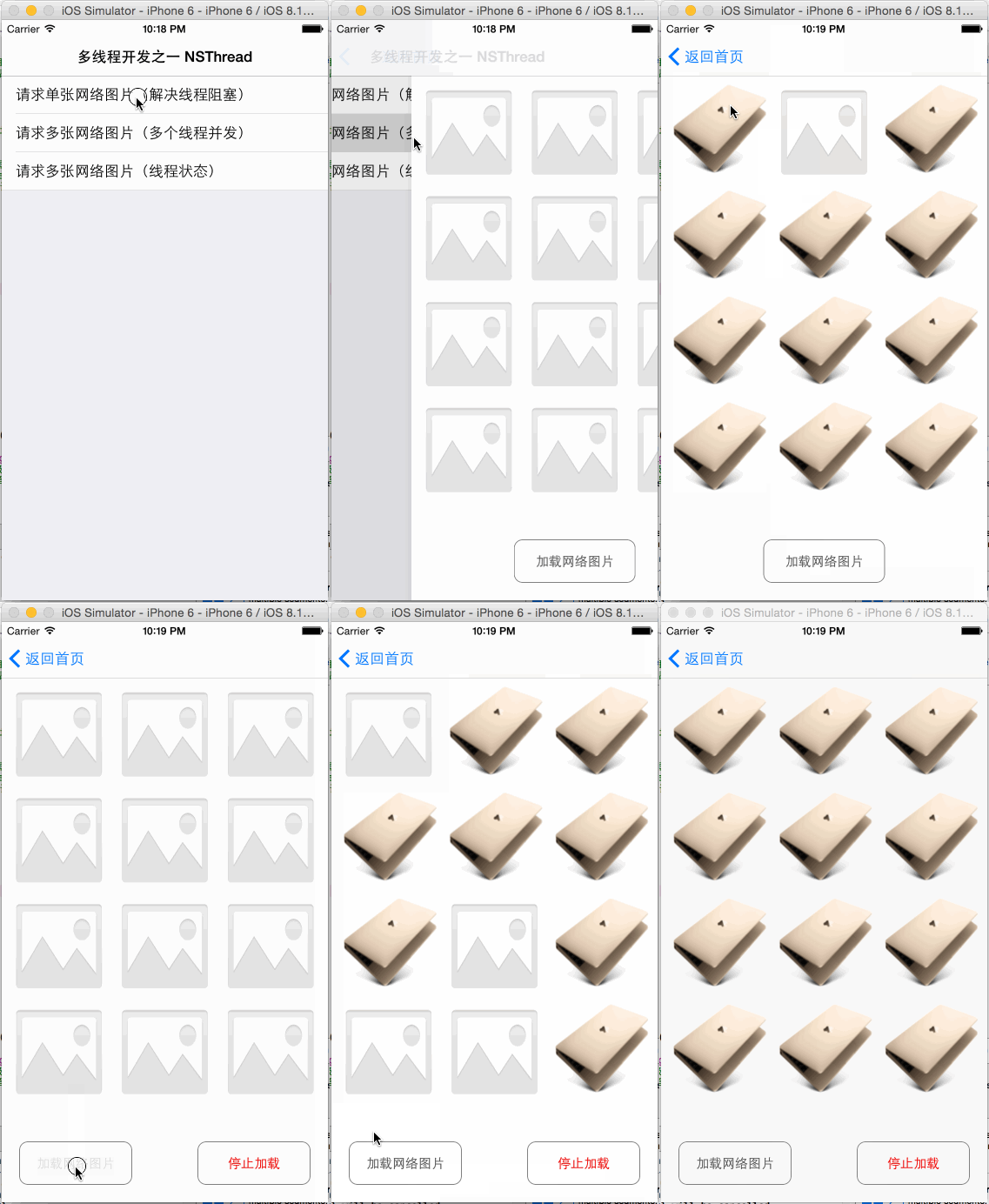
ViewController.h
1 #import <UIKit/UIKit.h> 2 3 @interface ViewController : UITableViewController 4 @PRoperty (copy, nonatomic) NSArray *arrSampleName; 5 6 - (instancetype)initWithSampleNameArray:(NSArray *)arrSampleName; 7 8 @end
ViewController.m
1 #import "ViewController.h"
2 #import "FirstSampleViewController.h"
3 #import "SecondSampleViewController.h"
4 #import "ThirdSampleViewController.h"
5
6 @interface ViewController ()
7 - (void)layoutUI;
8 @end
9
10 @implementation ViewController
11 - (void)viewDidLoad {
12 [super viewDidLoad];
13
14 [self layoutUI];
15 }
16
17 - (void)didReceiveMemoryWarning {
18 [super didReceiveMemoryWarning];
19 // Dispose of any resources that can be recreated.
20 }
21
22 - (instancetype)initWithSampleNameArray:(NSArray *)arrSampleName {
23 if (self = [super initWithStyle:UITableViewStyleGrouped]) {
24 self.navigationItem.title = @"多线程开发之一 NSThread";
25 self.navigationItem.backBarButtonItem = [[UIBarButtonItem alloc] initWithTitle:@"返回首页" style:UIBarButtonItemStylePlain target:nil action:nil];
26
27 _arrSampleName = arrSampleName;
28 }
29 return self;
30 }
31
32 - (void)layoutUI {
33
34 }
35
36 #pragma mark - UITableViewController相关方法重写
37 - (CGFloat)tableView:(UITableView *)tableView heightForHeaderInSection:(NSInteger)section {
38 return 0.1;
39 }
40
41 - (NSInteger)numberOfSectionsInTableView:(UITableView *)tableView {
42 return 1;
43 }
44
45 - (NSInteger)tableView:(UITableView *)tableView numberOfRowsInSection:(NSInteger)section {
46 return [_arrSampleName count];
47 }
48
49 - (UITableViewCell *)tableView:(UITableView *)tableView cellForRowAtIndexPath:(NSIndexPath *)indexPath {
50 static NSString *cellIdentifier = @"cell";
51 UITableViewCell *cell = [tableView dequeueReusableCellWithIdentifier:cellIdentifier];
52 if (!cell) {
53 cell = [[UITableViewCell alloc] initWithStyle:UITableViewCellStyleDefault reuseIdentifier:cellIdentifier];
54 }
55 cell.textLabel.text = _arrSampleName[indexPath.row];
56 return cell;
57 }
58
59 - (void)tableView:(UITableView *)tableView didSelectRowAtIndexPath:(NSIndexPath *)indexPath {
60 switch (indexPath.row) {
61 case 0: {
62 FirstSampleViewController *firstSampleVC = [FirstSampleViewController new];
63 [self.navigationController pushViewController:firstSampleVC animated:YES];
64 break;
65 }
66 case 1: {
67 SecondSampleViewController *secondSampleVC = [SecondSampleViewController new];
68 [self.navigationController pushViewController:secondSampleVC animated:YES];
69 break;
70 }
71 case 2: {
72 ThirdSampleViewController *thirdSampleVC = [ThirdSampleViewController new];
73 [self.navigationController pushViewController:thirdSampleVC animated:YES];
74 break;
75
76 /*
77 类似堆栈的先进后出的原理:
78 返回到(上一级)、(任意级)、(根级)导航
79 [self.navigationController popViewControllerAnimated:YES];
80 [self.navigationController popToViewController:thirdSampleVC animated:YES];
81 [self.navigationController popToRootViewControllerAnimated:YES];
82 */
83 }
84 default:
85 break;
86 }
87 }
88
89 @end
UIImage+RescaleImage.h
1 #import <UIKit/UIKit.h> 2 3 @interface UIImage (RescaleImage) 4 /** 5 * 根据宽高大小,获取对应的缩放图片 6 * 7 * @param size 宽高大小 8 * 9 * @return 对应的缩放图片 10 */ 11 - (UIImage *)rescaleImageToSize:(CGSize)size; 12 13 @end
UIImage+RescaleImage.m
1 #import "UIImage+RescaleImage.h"
2
3 @implementation UIImage (RescaleImage)
4
5 - (UIImage *)rescaleImageToSize:(CGSize)size {
6 CGRect rect = CGRectMake(0.0, 0.0, size.width, size.height);
7
8 UIGraphicsBeginImageContext(rect.size);
9 [self drawInRect:rect];
10 UIImage *imgScale = UIGraphicsGetImageFromCurrentImageContext();
11 UIGraphicsEndImageContext();
12
13 return imgScale;
14 }
15
16 @end
KMImageData.h
1 #import <Foundation/Foundation.h> 2 3 @interface KMImageData : NSObject 4 @property (assign, nonatomic) NSInteger index; 5 @property (strong, nonatomic) NSData *data; 6 7 - (instancetype)initWithData:(NSData *)data withIndex:(NSInteger)index; 8 9 @end
KMImageData.m
1 #import "KMImageData.h"
2
3 @implementation KMImageData
4
5 - (instancetype)initWithData:(NSData *)data withIndex:(NSInteger)index {
6 if (self = [super init]) {
7 _data = data;
8 _index = index;
9 }
10 return self;
11 }
12
13 @end
FirstSampleViewController.h
1 #import <UIKit/UIKit.h> 2 3 @interface FirstSampleViewController : UIViewController 4 @property (assign, nonatomic) CGSize rescaleImageSize; 5 6 @property (strong, nonatomic) IBOutlet UIImageView *imgV; 7 @property (strong, nonatomic) IBOutlet UIButton *btnLoadImage; 8 9 @end
FirstSampleViewController.m
1 #import "FirstSampleViewController.h"
2 #import "UIImage+RescaleImage.h"
3
4 @interface FirstSampleViewController ()
5 - (void)layoutUI;
6 - (void)updateImage:(NSData *)imageData;
7 - (void)loadImageFromNetwork;
8 @end
9
10 @implementation FirstSampleViewController
11
12 - (void)viewDidLoad {
13 [super viewDidLoad];
14
15 [self layoutUI];
16 }
17
18 - (void)didReceiveMemoryWarning {
19 [super didReceiveMemoryWarning];
20 // Dispose of any resources that can be recreated.
21 }
22
23 - (void)dealloc {
24 _imgV.image = nil;
25 }
26
27 - (void)layoutUI {
28 CGFloat width = [[UIScreen mainScreen] bounds].size.width; //bounds 返回整个屏幕大小;applicationFrame 返回去除状态栏后的屏幕大小
29 CGFloat height = width * 150.0 / 190.0;
30 _rescaleImageSize = CGSizeMake(width, height);
31
32 //NSString *path = [[NSBundle mainBundle] pathForResource:@"PictureNo@2x" ofType:@"png"];
33 //_imgV.image = [UIImage imageWithContentsOfFile:path];
34
35 _btnLoadImage.tintColor = [UIColor darkGrayColor];
36 _btnLoadImage.layer.masksToBounds = YES;
37 _btnLoadImage.layer.cornerRadius = 10.0;
38 _btnLoadImage.layer.borderColor = [UIColor grayColor].CGColor;
39 _btnLoadImage.layer.borderWidth = 1.0;
40 }
41
42 - (void)updateImage:(NSData *)imageData {
43 UIImage *img = [UIImage imageWithData:imageData];
44 _imgV.image = [img rescaleImageToSize:_rescaleImageSize];
45 }
46
47 - (void)loadImageFromNetwork {
48 NSURL *url = [NSURL URLWithString:@"http://images.apple.com/v/macbook/c/overview/images/hero_static_large.jpg"];
49 NSData *data = [NSData dataWithContentsOfURL:url];
50
51 /*将数据显示到UI控件,注意只能在主线程中更新UI;
52 另外 performSelectorOnMainThread 方法是 NSObject 的分类方法,每个 NSObject 对象都有此方法;
53 它调用的 selector 方法是当前调用控件的方法,例如使用 UIImageView 调用的时候 selector 就是 UIImageView 的方法
54 withObject:代表调用方法的参数,不过只能传递一个参数(如果有多个参数请使用对象进行封装)
55 waitUntilDone:是否线程任务完成执行
56 */
57 [self performSelectorOnMainThread:@selector(updateImage:)
58 withObject:data
59 waitUntilDone:YES];
60 }
61
62 - (IBAction)loadImage:(id)sender {
63 //方法一:使用线程对象实例方法创建一个线程
64 //NSThread *thread = [[NSThread alloc] initWithTarget:self
65 // selector:@selector(loadImageFromNetwork)
66 // object:nil];
67 //[thread start]; //启动一个线程;注意启动一个线程并非就一定立即执行,而是处于就绪状态,当系统调度时才真正执行
68
69 //方法二:使用线程类方法创建一个线程
70 [NSThread detachNewThreadSelector:@selector(loadImageFromNetwork)
71 toTarget:self
72 withObject:nil];
73 }
74
75 @end
FirstSampleViewController.xib
1 <?xml version="1.0" encoding="UTF-8" standalone="no"?> 2 <document type="com.apple.InterfaceBuilder3.CocoaTouch.XIB" version="3.0" toolsVersion="7706" systemVersion="14E46" targetRuntime="iOS.CocoaTouch" propertyaccessControl="none" useAutolayout="YES" useTraitCollections="YES"> 3 <dependencies> 4 <deployment identifier="iOS"/> 5 <plugIn identifier="com.apple.InterfaceBuilder.IBCocoaTouchPlugin" version="7703"/> 6 </dependencies> 7 <objects> 8 <placeholder placeholderIdentifier="IBFilesOwner" id="-1" userLabel="File's Owner" customClass="FirstSampleViewController"> 9 <connections> 10 <outlet property="btnLoadImage" destination="sLs-f1-Gzc" id="kX8-J0-v0V"/> 11 <outlet property="imgV" destination="4Qp-uk-KAb" id="RM3-Ha-glh"/> 12 <outlet property="view" destination="i5M-Pr-FkT" id="sfx-zR-JGt"/> 13 </connections> 14 </placeholder> 15 <placeholder placeholderIdentifier="IBFirstResponder" id="-2" customClass="UIResponder"/> 16 <view clearsContextBeforeDrawing="NO" contentMode="scaleToFill" id="i5M-Pr-FkT"> 17 <rect key="frame" x="0.0" y="0.0" width="600" height="600"/> 18 <autoresizingMask key="autoresizingMask" widthSizable="YES" heightSizable="YES"/> 19 <subviews> 20 <imageView userInteractionEnabled="NO" contentMode="scaleToFill" horizontalHuggingPriority="251" verticalHuggingPriority="251" image="PictureNo.png" translatesAutoresizingMaskIntoConstraints="NO" id="4Qp-uk-KAb"> 21 <rect key="frame" x="205" y="225" width="190" height="150"/> 22 <constraints> 23 <constraint firstAttribute="height" constant="150" id="Sip-Wd-idU"/> 24 <constraint firstAttribute="height" constant="150" id="VwM-i1-atB"/> 25 <constraint firstAttribute="width" constant="190" id="mUh-Bu-tUd"/> 26 <constraint firstAttribute="width" constant="190" id="mdJ-1c-QFa"/> 27 <constraint firstAttribute="width" constant="190" id="sVS-bU-Ty9"/> 28 <constraint firstAttribute="height" constant="150" id="uMG-oN-J56"/> 29 <constraint firstAttribute="height" constant="150" id="vws-Qw-UrB"/> 30 </constraints> 31 <variation key="default"> 32 <mask key="constraints"> 33 <exclude reference="SIp-Wd-idU"/> 34 <exclude reference="VwM-i1-atB"/> 35 <exclude reference="mUh-Bu-tUd"/> 36 <exclude reference="mdJ-1c-QFa"/> 37 <exclude reference="sVS-bU-Ty9"/> 38 <exclude reference="uMG-oN-J56"/> 39 <exclude reference="vws-Qw-UrB"/> 40 </mask> 41 </variation> 42 </imageView> 43 <button opaque="NO" contentMode="scaleToFill" contentHorizontalAlignment="center" contentVerticalAlignment="center" buttonType="roundedRect" lineBreakMode="middleTruncation" translatesAutoresizingMaskIntoConstraints="NO" id="sLs-f1-Gzc"> 44 <rect key="frame" x="230" y="500" width="140" height="50"/> 45 <constraints> 46 <constraint firstAttribute="width" constant="140" id="1jv-9K-mdH"/> 47 <constraint firstAttribute="height" constant="50" id="Q2w-vR-9ac"/> 48 </constraints> 49 <state key="normal" title="加载网络图片"> 50 <color key="titleShadowColor" white="0.5" alpha="1" colorSpace="calibratedWhite"/> 51 </state> 52 <connections> 53 <action selector="loadImage:" destination="-1" eventType="touchUpInside" id="fdy-Ln-5oS"/> 54 </connections> 55 </button> 56 </subviews> 57 <color key="backgroundColor" white="1" alpha="1" colorSpace="custom" customColorSpace="calibratedWhite"/> 58 <constraints> 59 <constraint firstItem="4Qp-uk-KAb" firstAttribute="leading" secondItem="i5M-Pr-FkT" secondAttribute="leading" constant="205" id="2a2-mS-WFa"/> 60 <constraint firstItem="sLs-f1-Gzc" firstAttribute="top" secondItem="i5M-Pr-FkT" secondAttribute="top" id="ES4-wl-RBz"/> 61 <constraint firstItem="4Qp-uk-KAb" firstAttribute="centerY" secondItem="i5M-Pr-FkT" secondAttribute="centerY" id="MUJ-WA-sUf"/> 62 <constraint firstItem="4Qp-uk-KAb" firstAttribute="centerX" secondItem="sLs-f1-Gzc" secondAttribute="centerX" id="Q8a-1k-DzJ"/> 63 <constraint firstAttribute="bottom" secondItem="4Qp-uk-KAb" secondAttribute="bottom" constant="71" id="V0a-9y-Dwa"/> 64 <constraint firstAttribute="bottom" secondItem="sLs-f1-Gzc" secondAttribute="bottom" constant="50" id="VMG-CV-eeq"/> 65 <constraint firstItem="4Qp-uk-KAb" firstAttribute="top" secondItem="i5M-Pr-FkT" secondAttribute="top" constant="-71" id="gqW-Wq-4Zv"/> 66 <constraint firstItem="sLs-f1-Gzc" firstAttribute="centerX" secondItem="i5M-Pr-FkT" secondAttribute="centerX" id="kNf-6d-EJ8"/> 67 </constraints> 68 <variation key="default"> 69 <mask key="constraints"> 70 <exclude reference="2a2-mS-WFa"/> 71 <exclude reference="V0a-9y-Dwa"/> 72 <exclude reference="gqW-Wq-4Zv"/> 73 <exclude reference="ES4-wl-RBz"/> 74 </mask> 75 </variation> 76 </view> 77 </objects> 78 <resources> 79 <image name="PictureNo.png" width="190" height="150"/> 80 </resources> 81 </document>
SecondSampleViewController.h
1 #import <UIKit/UIKit.h> 2 3 @interface SecondSampleViewController : UIViewController 4 @property (assign, nonatomic) CGSize rescaleImageSize; 5 @property (strong, nonatomic) NSMutableArray *mArrImageView; 6 7 @property (strong, nonatomic) IBOutlet UIButton *btnLoadImage; 8 9 @end
SecondSampleViewController.m
1 #import "SecondSampleViewController.h"
2 #import "KMImageData.h"
3 #import "UIImage+RescaleImage.h"
4
5 #define kRowCount 4
6 #define kColumnCount 3
7 #define kCellSpacing 10.0
8
9 @interface SecondSampleViewController ()
10 - (void)layoutUI;
11 - (void)updateImage:(KMImageData *)imageData;
12 -(KMImageData *)requestData:(NSInteger)imageIndex;
13 - (void)loadImageFromNetwork:(NSNumber *)imageIndex;
14 @end
15
16 @implementation SecondSampleViewController
17
18 - (void)viewDidLoad {
19 [super viewDidLoad];
20
21 [self layoutUI];
22 }
23
24 - (void)didReceiveMemoryWarning {
25 [super didReceiveMemoryWarning];
26 // Dispose of any resources that can be recreated.
27 }
28
29 - (void)dealloc {
30 _mArrImageView = nil;
31 }
32
33 - (void)layoutUI {
34 CGFloat width = ([[UIScreen mainScreen] bounds].size.width - ((kColumnCount + 1) * kCellSpacing)) / kColumnCount;
35 _rescaleImageSize = CGSizeMake(width, width);
36
37 CGFloat heightOfStatusAndNav = 20.0 + 44.0;
38 NSString *path = [[NSBundle mainBundle] pathForResource:@"PictureNo@2x" ofType:@"png"];
39 UIImage *img = [UIImage imageWithContentsOfFile:path];
40 _mArrImageView = [NSMutableArray arrayWithCapacity:kRowCount * kColumnCount];
41 //初始化多个图片视图
42 for (NSUInteger i=0; i<kRowCount; i++) {
43 for (NSUInteger j=0; j<kColumnCount; j++) {
44 UIImageView *imgV = [[UIImageView alloc] initWithFrame:
45 CGRectMake(_rescaleImageSize.width * j + kCellSpacing * (j+1),
46 _rescaleImageSize.height * i + kCellSpacing * (i+1) + heightOfStatusAndNav,
47 _rescaleImageSize.width,
48 _rescaleImageSize.height)];
49 imgV.image = img;
50 [self.view addSubview:imgV];
51 [_mArrImageView addObject:imgV];
52 }
53 }
54
55 _btnLoadImage.tintColor = [UIColor darkGrayColor];
56 _btnLoadImage.layer.masksToBounds = YES;
57 _btnLoadImage.layer.cornerRadius = 10.0;
58 _btnLoadImage.layer.borderColor = [UIColor grayColor].CGColor;
59 _btnLoadImage.layer.borderWidth = 1.0;
60 }
61
62 - (void)updateImage:(KMImageData *)imageData {
63 UIImage *img = [UIImage imageWithData:imageData.data];
64 UIImageView *imgVCurrent = _mArrImageView[imageData.index];
65 imgVCurrent.image = [img rescaleImageToSize:_rescaleImageSize];
66 }
67
68 -(KMImageData *)requestData:(NSInteger)imageIndex {
69 //对于多线程操作,建议把线程操作放到 @autoreleasepool 中
70 @autoreleasepool {
71 if (imageIndex != kRowCount * kColumnCount - 1) { //虽然设置了最后一个线程的优先级为1.0,但无法保证他是第一个加载的。所以我们这里让其他线程挂起0.5秒,这样基本能保证最后一个线程第一个加载,除非网络非常差的情况
72 [NSThread sleepForTimeInterval:0.5];
73 }
74
75 NSURL *url = [NSURL URLWithString:@"http://images.apple.com/v/macbook/c/overview/images/hero_static_large.jpg"];
76 NSData *data = [NSData dataWithContentsOfURL:url];
77 KMImageData *imageData = [[KMImageData alloc] initWithData:data
78 withIndex:imageIndex];
79 return imageData;
80 }
81 }
82
83 - (void)loadImageFromNetwork:(NSNumber *)imageIndex {
84 NSLog(@"Current thread:%@",[NSThread currentThread]);
85
86 /*将数据显示到UI控件,注意只能在主线程中更新UI;
87 另外 performSelectorOnMainThread 方法是 NSObject 的分类方法,每个 NSObject 对象都有此方法;
88 它调用的 selector 方法是当前调用控件的方法,例如使用 UIImageView 调用的时候 selector 就是 UIImageView 的方法
89 withObject:代表调用方法的参数,不过只能传递一个参数(如果有多个参数请使用对象进行封装)
90 waitUntilDone:是否线程任务完成执行
91 */
92 [self performSelectorOnMainThread:@selector(updateImage:)
93 withObject:[self requestData:[imageIndex integerValue]]
94 waitUntilDone:YES];
95 }
96
97 - (IBAction)loadImage:(id)sender {
98 for (NSUInteger i=0, len=kRowCount * kColumnCount; i<len; i++) {
99 NSThread *thread = [[NSThread alloc] initWithTarget:self
100 selector:@selector(loadImageFromNetwork:)
101 object:[NSNumber numberWithInteger:i]];
102 thread.name = [NSString stringWithFormat:@"Thread %lu", (unsigned long)i];
103 thread.threadPriority = i == len-1 ? 1.0 : 0.0; //设置线程优先级;0.0-1.0,值越高优先级越高,这样可以提高他被优先加载的机率,但是他也未必就第一个加载。因为首先其他线程是先启动的,其次网络状况我们没办法修改
104 [thread start];
105 }
106 }
107
108 @end
SecondSampleViewController.xib
1 <?xml version="1.0" encoding="UTF-8" standalone="no"?> 2 <document type="com.apple.InterfaceBuilder3.CocoaTouch.XIB" version="3.0" toolsVersion="7706" systemVersion="14E46" targetRuntime="iOS.CocoaTouch" propertyAccessControl="none" useAutolayout="YES" useTraitCollections="YES"> 3 <dependencies> 4 <deployment identifier="iOS"/> 5 <plugIn identifier="com.apple.InterfaceBuilder.IBCocoaTouchPlugin" version="7703"/> 6 </dependencies> 7 <objects> 8 <placeholder placeholderIdentifier="IBFilesOwner" id="-1" userLabel="File's Owner" customClass="SecondSampleViewController"> 9 <connections> 10 <outlet property="btnLoadImage" destination="F5h-ZI-gGL" id="I40-e2-bAa"/> 11 <outlet property="view" destination="i5M-Pr-FkT" id="sfx-zR-JGt"/> 12 </connections> 13 </placeholder> 14 <placeholder placeholderIdentifier="IBFirstResponder" id="-2" customClass="UIResponder"/> 15 <view clearsContextBeforeDrawing="NO" contentMode="scaleToFill" id="i5M-Pr-FkT"> 16 <rect key="frame" x="0.0" y="0.0" width="600" height="600"/> 17 <autoresizingMask key="autoresizingMask" widthSizable="YES" heightSizable="YES"/> 18 <subviews> 19 <button opaque="NO" contentMode="scaleToFill" contentHorizontalAlignment="center" contentVerticalAlignment="center" buttonType="roundedRect" lineBreakMode="middleTruncation" translatesAutoresizingMaskIntoConstraints="NO" id="F5h-ZI-gGL"> 20 <rect key="frame" x="230" y="530" width="140" height="50"/> 21 <constraints> 22 <constraint firstAttribute="height" constant="50" id="HWd-Xc-Wk7"/> 23 <constraint firstAttribute="width" constant="140" id="vrH-qE-PNK"/> 24 </constraints> 25 <state key="normal" title="加载网络图片"> 26 <color key="titleShadowColor" white="0.5" alpha="1" colorSpace="calibratedWhite"/> 27 </state> 28 <connections> 29 <action selector="loadImage:" destination="-1" eventType="touchUpInside" id="Hgw-q8-lHy"/> 30 </connections> 31 </button> 32 </subviews> 33 <color key="backgroundColor" white="1" alpha="1" colorSpace="custom" customColorSpace="calibratedWhite"/> 34 <constraints> 35 <constraint firstAttribute="bottom" secondItem="F5h-ZI-gGL" secondAttribute="bottom" constant="20" id="jPY-fY-9XJ"/> 36 <constraint firstAttribute="centerX" secondItem="F5h-ZI-gGL" secondAttribute="centerX" id="rH1-sV-pST"/> 37 </constraints> 38 </view> 39 </objects> 40 </document>
ThirdSampleViewController.h
1 #import <UIKit/UIKit.h> 2 3 @interface ThirdSampleViewController : UIViewController 4 @property (assign, nonatomic) CGSize rescaleImageSize; 5 @property (strong, nonatomic) NSMutableArray *mArrImageView; 6 @property (strong, nonatomic) NSMutableArray *mArrThread; 7 8 @property (strong, nonatomic) IBOutlet UIButton *btnLoadImage; 9 @property (strong, nonatomic) IBOutlet UIButton *btnStopLoadImage; 10 11 @end
ThirdSampleViewController.m
1 #import "ThirdSampleViewController.h"
2 #import "KMImageData.h"
3 #import "UIImage+RescaleImage.h"
4
5 #define kRowCount 4
6 #define kColumnCount 3
7 #define kCellSpacing 10.0
8
9 @interface ThirdSampleViewController ()
10 - (void)layoutUI;
11 - (void)updateImage:(KMImageData *)imageData;
12 -(KMImageData *)requestData:(NSInteger)imageIndex;
13 - (void)loadImageFromNetwork:(NSNumber *)imageIndex;
14 @end
15
16 @implementation ThirdSampleViewController
17
18 - (void)viewDidLoad {
19 [super viewDidLoad];
20
21 [self layoutUI];
22 }
23
24 - (void)didReceiveMemoryWarning {
25 [super didReceiveMemoryWarning];
26 // Dispose of any resources that can be recreated.
27 }
28
29 - (void)dealloc {
30 _mArrImageView = nil;
31 _mArrThread = nil;
32 }
33
34 - (void)layoutUI {
35 CGFloat width = ([[UIScreen mainScreen] bounds].size.width - ((kColumnCount + 1) * kCellSpacing)) / kColumnCount;
36 _rescaleImageSize = CGSizeMake(width, width);
37
38 CGFloat heightOfStatusAndNav = 20.0 + 44.0;
39 NSString *path = [[NSBundle mainBundle] pathForResource:@"PictureNo@2x" ofType:@"png"];
40 UIImage *img = [UIImage imageWithContentsOfFile:path];
41 _mArrImageView = [NSMutableArray arrayWithCapacity:kRowCount * kColumnCount];
42 //初始化多个图片视图
43 for (NSUInteger i=0; i<kRowCount; i++) {
44 for (NSUInteger j=0; j<kColumnCount; j++) {
45 UIImageView *imgV = [[UIImageView alloc] initWithFrame:
46 CGRectMake(_rescaleImageSize.width * j + kCellSpacing * (j+1),
47 _rescaleImageSize.height * i + kCellSpacing * (i+1) + heightOfStatusAndNav,
48 _rescaleImageSize.width,
49 _rescaleImageSize.height)];
50 imgV.image = img;
51 [self.view addSubview:imgV];
52 [_mArrImageView addObject:imgV];
53 }
54 }
55
56 void (^beautifulButton)(UIButton *, UIColor *) = ^(UIButton *btn, UIColor *tintColor) {
57 btn.tintColor = tintColor;
58 btn.layer.masksToBounds = YES;
59 btn.layer.cornerRadius = 10.0;
60 btn.layer.borderColor = [UIColor grayColor].CGColor;
61 btn.layer.borderWidth = 1.0;
62 };
63
64 beautifulButton(_btnLoadImage, [UIColor darkGrayColor]);
65 beautifulButton(_btnStopLoadImage, [UIColor redColor]);
66 }
67
68 - (void)updateImage:(KMImageData *)imageData {
69 UIImage *img = [UIImage imageWithData:imageData.data];
70 UIImageView *imgVCurrent = _mArrImageView[imageData.index];
71 imgVCurrent.image = [img rescaleImageToSize:_rescaleImageSize];
72 }
73
74 -(KMImageData *)requestData:(NSInteger)imageIndex {
75 //对于多线程操作,建议把线程操作放到 @autoreleasepool 中
76 @autoreleasepool {
77 if (imageIndex != kRowCount * kColumnCount - 1) { //虽然设置了最后一个线程的优先级为1.0,但无法保证他是第一个加载的。所以我们这里让其他线程挂起0.5秒,这样基本能保证最后一个线程第一个加载,除非网络非常差的情况
78 [NSThread sleepForTimeInterval:0.5];
79 }
80
81 NSURL *url = [NSURL URLWithString:@"http://images.apple.com/v/macbook/c/overview/images/hero_static_large.jpg"];
82 NSData *data = [NSData dataWithContentsOfURL:url];
83 KMImageData *imageData = [[KMImageData alloc] initWithData:data
84 withIndex:imageIndex];
85 return imageData;
86 }
87 }
88
89 - (void)loadImageFromNetwork:(NSNumber *)imageIndex { //子线程中执行
90 //线程状态:thread.isExecuting(是否执行中)、thread.isFinished(是否已完成)、thread.isCancelled(是否已取消)
91 //thread.isMainThread(是否主线程)、[NSThread isMultiThreaded](是否多线程)
92
93 KMImageData *imageData = [self requestData:[imageIndex integerValue]];
94
95 NSThread *thread = _mArrThread[[imageIndex integerValue]];
96 if (thread.isCancelled) { //判断线程是否已经取消,如是就退出当前线程;这里注意需让 exit 操作有足够的时间进行占用资源的释放,否则有可能出现异常;比如 Demo 中:当点击「停止加载」按钮后,再次快速点击「加载网络图片」按钮
97 NSLog(@"Current thread:%@ will be cancelled.", thread);
98 [NSThread exit];
99 } else {
100 // //在后台执行一个方法,本质就是重新创建一个线程来执行方法
101 // [self performSelectorInBackground:@selector(updateImage:) withObject:imageData];
102 //
103 // /*将数据显示到UI控件,注意只能在主线程中更新UI;
104 // 另外 performSelectorOnMainThread 方法是 NSObject 的分类方法,每个 NSObject 对象都有此方法;它调用的 selector 方法是当前调用控件的方法,例如使用 UIImageView 调用的时候 selector 就是 UIImageView 的方法
105 // withObject:代表调用方法的参数,不过只能传递一个参数(如果有多个参数请使用对象进行封装)
106 // waitUntilDone:是否线程任务完成后执行
107 // */
108 // [self performSelectorOnMainThread:@selector(updateImage:)
109 // withObject:imageData
110 // waitUntilDone:YES];
111
112 @try {
113 //在指定的线程上执行一个方法,需要用户创建一个线程对象实例
114 [self performSelector:@selector(updateImage:)
115 onThread:thread
116 withObject:imageData
117 waitUntilDone:YES];
118 }
119 @catch (NSException *exception) {
120 NSLog(@"Exception: %@", [exception description]);
121 }
122 }
123 }
124
125 - (IBAction)loadImage:(id)sender {
126 NSUInteger len = kRowCount * kColumnCount;
127 _mArrThread = [NSMutableArray arrayWithCapacity:len];
128
129 //循环创建多个线程
130 for (NSUInteger i=0; i<len; i++) {
131 NSThread *thread = [[NSThread alloc] initWithTarget:self
132 selector:@selector(loadImageFromNetwork:)
133 object:[NSNumber numberWithInteger:i]];
134 thread.name = [NSString stringWithFormat:@"Thread %lu", (unsigned long)i];
135 thread.threadPriority = i == len-1 ? 1.0 : 0.0; //设置线程优先级;0.0-1.0,值越高优先级越高,这样可以提高他被优先加载的机率,但是他也未必就第一个加载。因为首先其他线程是先启动的,其次网络状况我们没办法修改
136 [_mArrThread addObject:thread];
137 }
138
139 //循环启动线程
140 for (NSUInteger i=0; i<len; i++) {
141 NSThread *thread = _mArrThread[i];
142 [thread start];
143 }
144 }
145
146 - (IBAction)stopLoadImage:(id)sender { //主线程中执行
147 for (NSUInteger i=0, len=kRowCount * kColumnCount; i<len; i++) {
148 NSThread *thread = _mArrThread[i];
149 if (!thread.isFinished) { //判断线程是否完成,如果没有完成则设置为取消状态;取消状态仅仅是改变了线程状态而言,并不能终止线程
150 [thread cancel];
151 }
152 }
153 }
154
155 @end
ThirdSampleViewController.xib
1 <?xml version="1.0" encoding="UTF-8" standalone="no"?> 2 <document type="com.apple.InterfaceBuilder3.CocoaTouch.XIB" version="3.0" toolsVersion="7706" systemVersion="14E46" targetRuntime="iOS.CocoaTouch" propertyAccessControl="none" useAutolayout="YES" useTraitCollections="YES"> 3 <dependencies> 4 <deployment identifier="iOS"/> 5 <plugIn identifier="com.apple.InterfaceBuilder.IBCocoaTouchPlugin" version="7703"/> 6 </dependencies> 7 <objects> 8 <placeholder placeholderIdentifier="IBFilesOwner" id="-1" userLabel="File's Owner" customClass="ThirdSampleViewController"> 9 <connections> 10 <outlet property="btnLoadImage" destination="F5h-ZI-gGL" id="I40-e2-bAa"/> 11 <outlet property="btnStopLoadImage" destination="gnu-KE-bGq" id="tOA-t9-OA9"/> 12 <outlet property="view" destination="i5M-Pr-FkT" id="sfx-zR-JGt"/> 13 </connections> 14 </placeholder> 15 <placeholder placeholderIdentifier="IBFirstResponder" id="-2" customClass="UIResponder"/> 16 <view clearsContextBeforeDrawing="NO" contentMode="scaleToFill" id="i5M-Pr-FkT"> 17 <rect key="frame" x="0.0" y="0.0" width="600" height="600"/> 18 <autoresizingMask key="autoresizingMask" widthSizable="YES" heightSizable="YES"/> 19 <subviews> 20 <button opaque="NO" contentMode="scaleToFill" contentHorizontalAlignment="center" contentVerticalAlignment="center" buttonType="roundedRect" lineBreakMode="middleTruncation" translatesAutoresizingMaskIntoConstraints="NO" id="F5h-ZI-gGL"> 21 <rect key="frame" x="20" y="530" width="130" height="50"/> 22 <constraints> 23 <constraint firstAttribute="height" constant="50" id="HWd-Xc-Wk7"/> 24 <constraint firstAttribute="width" constant="130" id="vrH-qE-PNK"/> 25 </constraints> 26 <state key="normal" title="加载网络图片"> 27 <color key="titleShadowColor" white="0.5" alpha="1" colorSpace="calibratedWhite"/> 28 </state> 29 <connections> 30 <action selector="loadImage:" destination="-1" eventType="touchUpInside" id="Hgw-q8-lHy"/> 31 </connections> 32 </button> 33 <button opaque="NO" contentMode="scaleToFill" contentHorizontalAlignment="center" contentVerticalAlignment="center" buttonType="roundedRect" lineBreakMode="middleTruncation" translatesAutoresizingMaskIntoConstraints="NO" id="gnu-KE-bGq"> 34 <rect key="frame" x="450" y="530" width="130" height="50"/> 35 <constraints> 36 <constraint firstAttribute="height" constant="50" id="1R7-22-hMk"/> 37 <constraint firstAttribute="width" constant="130" id="64l-yF-IFO"/> 38 </constraints> 39 <state key="normal" title="停止加载"> 40 <color key="titleShadowColor" white="0.5" alpha="1" colorSpace="calibratedWhite"/> 41 </state> 42 <connections> 43 <action selector="loadImage:" destination="-1" eventType="touchUpInside" id="PyX-RW-cbL"/> 44 <action selector="stopLoadImage:" destination="-1" eventType="touchUpInside" id="1Xa-Ek-D4B"/> 45 </connections> 46 </button> 47 </subviews> 48 <color key="backgroundColor" white="1" alpha="1" colorSpace="custom" customColorSpace="calibratedWhite"/> 49 <constraints> 50 <constraint firstItem="F5h-ZI-gGL" firstAttribute="leading" secondItem="i5M-Pr-FkT" secondAttribute="leading" constant="20" id="Glo-vW-SXd"/> 51 <constraint firstAttribute="trailing" secondItem="gnu-KE-bGq" secondAttribute="trailing" constant="20" id="IdF-1v-bg2"/> 52 <constraint firstAttribute="bottom" secondItem="gnu-KE-bGq" secondAttribute="bottom" constant="20" id="cyx-dg-K8M"/> 53 <constraint firstAttribute="bottom" secondItem="F5h-ZI-gGL" secondAttribute="bottom" constant="20" id="jPY-fY-9XJ"/> 54 <constraint firstAttribute="centerX" secondItem="F5h-ZI-gGL" secondAttribute="centerX" id="rH1-sV-pST"/> 55 </constraints> 56 <variation key="default"> 57 <mask key="constraints"> 58 <exclude reference="rH1-sV-pST"/> 59 </mask> 60 </variation> 61 </view> 62 </objects> 63 </document>
AppDelegate.h
1 #import <UIKit/UIKit.h> 2 3 @interface AppDelegate : UIResponder <UIApplicationDelegate> 4 5 @property (strong, nonatomic) UIWindow *window; 6 @property (strong, nonatomic) UINavigationController *navigationController; 7 8 @end
AppDelegate.m
1 #import "AppDelegate.h"
2 #import "ViewController.h"
3
4 @interface AppDelegate ()
5
6 @end
7
8 @implementation AppDelegate
9
10
11 - (BOOL)application:(UIApplication *)application didFinishLaunchingWithOptions:(NSDictionary *)launchOptions {
12 _window = [[UIWindow alloc] initWithFrame:[[UIScreen mainScreen] bounds]];
13 ViewController *viewController = [[ViewController alloc] initWithSampleNameArray:@[@"请求单张网络图片(解决线程阻塞)", @"请求多张网络图片(多个线程并发)", @"请求多张网络图片(线程状态)"]];
14 _navigationController = [[UINavigationController alloc] initWithRootViewController:viewController];
15 _window.rootViewController = _navigationController;
16 //[_window addSubview:_navigationController.view]; //当_window.rootViewController关联时,这一句可有可无
17 [_window makeKeyAndVisible];
18 return YES;
19 }
20
21 - (void)applicationWillResignActive:(UIApplication *)application {
22 }
23
24 - (void)applicationDidEnterBackground:(UIApplication *)application {
25 }
26
27 - (void)applicationWillEnterForeground:(UIApplication *)application {
28 }
29
30 - (void)applicationDidBecomeActive:(UIApplication *)application {
31 }
32
33 - (void)applicationWillTerminate:(UIApplication *)application {
34 }
35
36 @end
输出结果:
1 2015-08-24 22:18:38.945 NSThreadDemo[5361:204621] INFO: Reveal Server started (Protocol Version 18).
2 2015-08-24 22:18:57.863 NSThreadDemo[5361:204847] Current thread:<NSThread: 0x7f9f60cd1f80>{number = 5, name = Thread 0}
3 2015-08-24 22:18:57.863 NSThreadDemo[5361:204848] Current thread:<NSThread: 0x7f9f60c74800>{number = 6, name = Thread 1}
4 2015-08-24 22:18:57.863 NSThreadDemo[5361:204849] Current thread:<NSThread: 0x7f9f60cb8f30>{number = 7, name = Thread 2}
5 2015-08-24 22:18:57.863 NSThreadDemo[5361:204850] Current thread:<NSThread: 0x7f9f60cb8500>{number = 8, name = Thread 3}
6 2015-08-24 22:18:57.864 NSThreadDemo[5361:204851] Current thread:<NSThread: 0x7f9f60cd0c60>{number = 9, name = Thread 4}
7 2015-08-24 22:18:57.865 NSThreadDemo[5361:204857] Current thread:<NSThread: 0x7f9f60dee540>{number = 11, name = Thread 6}
8 2015-08-24 22:18:57.864 NSThreadDemo[5361:204856] Current thread:<NSThread: 0x7f9f60cd2150>{number = 10, name = Thread 5}
9 2015-08-24 22:18:57.866 NSThreadDemo[5361:204859] Current thread:<NSThread: 0x7f9f60daf730>{number = 13, name = Thread 8}
10 2015-08-24 22:18:57.866 NSThreadDemo[5361:204860] Current thread:<NSThread: 0x7f9f60db8530>{number = 14, name = Thread 9}
11 2015-08-24 22:18:57.866 NSThreadDemo[5361:204862] Current thread:<NSThread: 0x7f9f60f3f7e0>{number = 16, name = Thread 11}
12 2015-08-24 22:18:57.866 NSThreadDemo[5361:204858] Current thread:<NSThread: 0x7f9f60db2390>{number = 12, name = Thread 7}
13 2015-08-24 22:18:57.867 NSThreadDemo[5361:204861] Current thread:<NSThread: 0x7f9f60f231c0>{number = 15, name = Thread 10}
14
15 2015-08-24 22:19:07.073 NSThreadDemo[5361:204952] Current thread:<NSThread: 0x7f9f63010930>{number = 39, name = Thread 10} will be cancelled.
16 2015-08-24 22:19:07.691 NSThreadDemo[5361:204951] Current thread:<NSThread: 0x7f9f60df0210>{number = 38, name = Thread 9} will be cancelled.
17 2015-08-24 22:19:07.697 NSThreadDemo[5361:204957] Current thread:<NSThread: 0x7f9f60db8ee0>{number = 29, name = Thread 0} will be cancelled.
18 2015-08-24 22:19:07.729 NSThreadDemo[5361:204958] Current thread:<NSThread: 0x7f9f60db2390>{number = 30, name = Thread 1} will be cancelled.
19 2015-08-24 22:19:07.857 NSThreadDemo[5361:204949] Current thread:<NSThread: 0x7f9f63011190>{number = 36, name = Thread 7} will be cancelled.
20 2015-08-24 22:19:08.025 NSThreadDemo[5361:204960] Current thread:<NSThread: 0x7f9f6300c2d0>{number = 32, name = Thread 3} will be cancelled.
21 2015-08-24 22:19:08.047 NSThreadDemo[5361:204959] Current thread:<NSThread: 0x7f9f60dd4200>{number = 31, name = Thread 2} will be cancelled.
22 2015-08-24 22:19:08.191 NSThreadDemo[5361:204942] Current thread:<NSThread: 0x7f9f60db8ee0>{number = 29, name = Thread 0} will be cancelled.
23 2015-08-24 22:19:08.250 NSThreadDemo[5361:204965] Current thread:<NSThread: 0x7f9f630110b0>{number = 37, name = Thread 8} will be cancelled.
24 2015-08-24 22:19:08.416 NSThreadDemo[5361:204962] Current thread:<NSThread: 0x7f9f60df7bc0>{number = 34, name = Thread 5} will be cancelled.
25 2015-08-24 22:19:08.464 NSThreadDemo[5361:204963] Current thread:<NSThread: 0x7f9f60dc5ca0>{number = 35, name = Thread 6} will be cancelled.
26 2015-08-24 22:19:08.495 NSThreadDemo[5361:204964] Current thread:<NSThread: 0x7f9f63011190>{number = 36, name = Thread 7} will be cancelled.
27 2015-08-24 22:19:08.661 NSThreadDemo[5361:204966] Current thread:<NSThread: 0x7f9f60df0210>{number = 38, name = Thread 9} will be cancelled.
28 2015-08-24 22:19:10.033 NSThreadDemo[5361:204961] Current thread:<NSThread: 0x7f9f60da3330>{number = 33, name = Thread 4} will be cancelled.
29 2015-08-24 22:19:10.056 NSThreadDemo[5361:204967] Current thread:<NSThread: 0x7f9f63010930>{number = 39, name = Thread 10} will be cancelled.
- 上一篇文章: IOS开发基础知识--碎片21
- 下一篇文章: iOS-键盘常见处理,自定义键盘上的工具条、定义键自盘方法等