
·您现在的位置: 云翼网络 >> 文章中心 >> 网站建设 >> 网站建设开发 >> ASP.NET网站开发 >> 如何在一个人输入框中只输入数字
- ASP.NET中Cookie的用法
- 第002篇深入体验C#项目开发(一)
- 初试TinyIoCContainer笔记
- ExtJS与jQuery的一点细节上的对比
- NET环境下水晶报表使用总结
- [Asp.net 5] Localization-Asp.net运行时多语言
- [IIS]由安装IIS和.net framework先后顺序引发的问题,你中招了吗?
- 使用PagedDataSource类实现DataList和Repeater控件的分页显示
- MVC之MVCSQO方法查询、排序、分页、投影
- ASP.NET中的HTTP模块和处理程序
- 博客园的第一天
- 自己实现简单的AOP(五)使Demo适应webApi、亦可完成属性自动注入
- ASP.Net C#2.0全能数据库组件 (开源含实例源码)
- [视频]Visual Studio 2005入门之DataList分页\镶套
- 关于“属性”的几个问题,也许面试会问到哦~
- 在ASP.NET页中检测浏览器类型
- VisualStudio原生开发的10个调试技巧(一)
- 基于.NET C#的 sqlite 数据库 ORM 【Easyliter】
- net中统一的存储过程调用方法
- 基于WebForm+EasyUI的业务管理系统形成之旅 -- ParamQueryGrid行、列合并(Ⅸ)
- Session丢失原因与解决方案小结
- GridView无数据时,绑定提示
- 关于Asp.Net中的编程实现下载
- 在多台PC之间同步Resharper所有设置的方法
- exchange邮箱系统增加验证码机制
- ASP.NET程序中用Repeater实现分页
- 使用ASPX输出XML应注意的问题
- 类库LinqToExcel的介绍
- ASP.NET中如何调用存储过程
- asp.net 实现“九连环”小游戏
如何在一个人输入框中只输入数字
好久没写博客了,看到一篇博文讲如何在一个textbox中只能写数字的用js的
下面具体讲讲怎么实现,首先在web中新建一个空的web程序

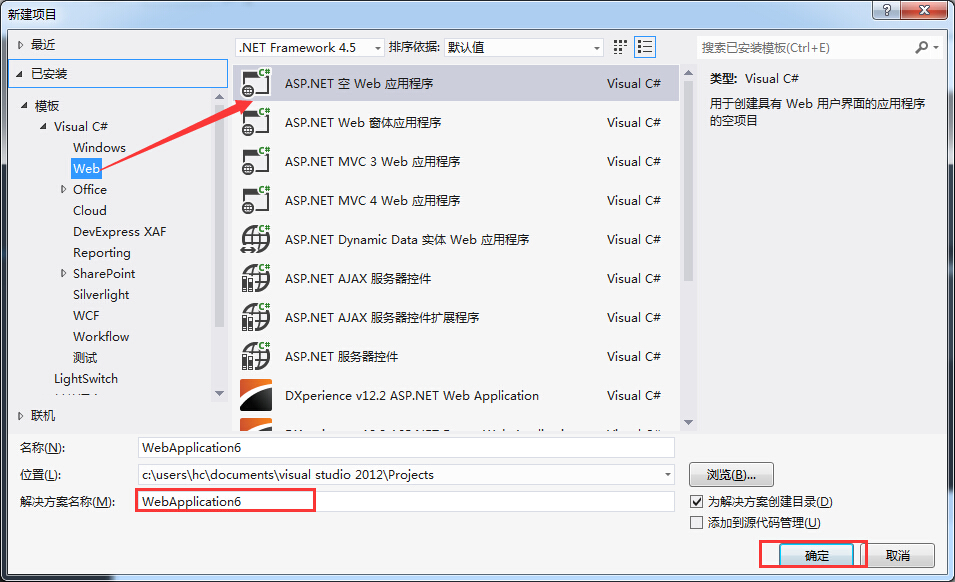 2,右键添加一个web窗体:
 3,在所得到的页面中书写js(记得从工具箱中拖入一个textbox)
写一个js方法能得到你所输入的字母的ASII code,如果你输入的是数字,将会返回true 否则返回flase;
3,在所得到的页面中书写js(记得从工具箱中拖入一个textbox)
写一个js方法能得到你所输入的字母的ASII code,如果你输入的是数字,将会返回true 否则返回flase;


<%@ Page Language="C#" AutoEventWireup="true" CodeBehind="WebForm1.aspx.cs" Inherits="Webapplication6.WebForm1" %>

<!DOCTYPE html>

<html xmlns="http://www.w3.org/1999/xhtml">
<head runat="server">
<meta http-equiv="Content-Type" content="text/html; charset=utf-8"/>
    <title></title>
    <script type="text/javascript">
        function ValidNumeric() {
            var charCode = event.whitch ? event.which : event.keyCode;
            if (charCode > 47 && charCode < 58)
            {
                return true;
            } else {
                return false;
            }

        }
    </script>
</head>
<body>
    <form id="form1" runat="server">
    <div>

    </div>
        LoginID<asp:TextBox ID="LoginID" runat="server" onkeyPRess="return ValidNumeric() "></asp:TextBox>
    </form>
</body>
</html>
<%@ Page Language="C#" AutoEventWireup="true" CodeBehind="WebForm1.aspx.cs" Inherits="WebApplication6.WebForm1" %>
<!DOCTYPE html>
<html xmlns="http://www.w3.org/1999/xhtml">
<head runat="server">
<meta http-equiv="Content-Type" content="text/html; charset=utf-8"/>
<title></title>
<script type="text/Javascript">
function ValidNumeric() {
var charCode = (event.which) ? event.which : event.keyCode;
if (charCode > 47 && charCode < 58)
{
return true;
} else {
return false;
}
}
</script>
</head>
<body>
<form id="form1" runat="server">
<div>
</div>
LoginID<asp:TextBox ID="LoginID" runat="server" onkeypress="return ValidNumeric() "></asp:TextBox>
</form>
</body>
</html>
然后你就可以看到结果了,
小小的简单例子,希望大家,喜欢
- 上一篇文章: vb.net播放资源文件中的音乐
- 下一篇文章: 13、C#基础整理(枚举)
- [.net 面向对象程序设计进阶] (18) 多线程(
- 简单多条件动态查询的实现
- Self Host模式下的ASP. NET Web API是如何进
- 从客户端中检测到有潜在危险的 request.for
- 使用asp.net2.0中的SiteMap中的一些问题
- ASP.NET读取RSS
- ASP.NET MVC 4.0 参考源码索引