
·您现在的位置: 云翼网络 >> 文章中心 >> 网站建设 >> 网站建设开发 >> ASP.NET网站开发 >> 无聊写了一个最简单的MVC4+Highcharts连数据库例子
- [视频]Visual Studio 2005入门之向导(Wizard)
- C#之Lambda不得不说的用法
- IIS 8的第一次请求不变慢如何配置
- ASP.NET MVC学前篇之请求流程
- asp.net程序中最常用的三十三种编程代码
- 查看w3wp进程占用的内存及.NET内存泄露,死锁分析
- vs2013中将原来在iis express中的网站转到iis中时,报“无法在web服务器上调试”的解决方法
- 精品图书推荐
- ASP.NET实现数据采集
- ASP.NET中散列加密密码
- XmlReader在序列化中的使用
- 从数据库导出数据到word、excel、.txt
- [原创] ASP.NET WEBAPI 接入微信公众平台 总结,Token验证失败解决办法
- [C#]简易日志记录,线程安全
- 收拾那掉了一地的session
- ASP.NET发送电子邮件
- asp.net后台注册js的四种方法
- 下载文件关闭窗体之解决方法
- 运行 ASP.NET 的进程帐户必须具有IIS 元数据库权限
- Unity IOC注入详细配置(MVC,WebApi)
- c#GridControl怎么换行
- 生成验证码的方法集合(一)
- ASP.NET 使用Ajax(转)
- 精彩 .NET 2015
- [Asp.net5]ApplicationBuilder详解
- chart控件怎么使x轴标签全部显示出来
- 分享一个动态生成RDLC报表的类
- C#中使用ADOMD.NET查询多维数据集
- .NetCollection的一些理解——记录一次向实习生的答疑
- .NET扩展方法(一)
无聊写了一个最简单的MVC4+Highcharts连数据库例子
作者:佚名 ASP.NET网站开发编辑:admin 更新时间:2022-07-23
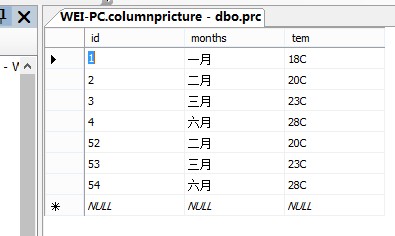
乱搞了个数据库 后面发现没定INT类型 直接将ID当数据显示了
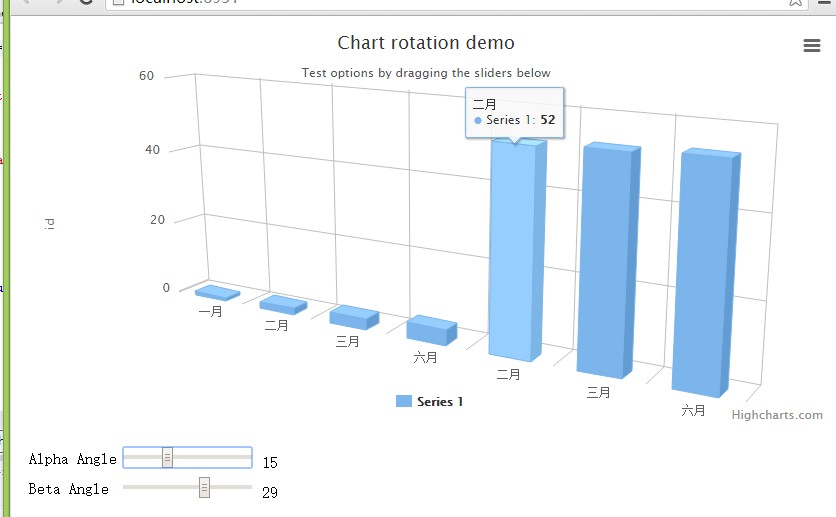
效果图:
前端


  1 @{
  2     Layout = null;
  3 }
  4
  5 <!DOCTYPE html>
  6
  7 <html>
  8 <head>
  9     <meta name="viewport" content="width=device-width" />
 10
 11     <script src="~/Scripts/jquery-1.7.1.js"></script>
 12     <script src="~/Scripts/Highcharts-4.0.3/js/highcharts.js"></script>
 13     <script src="~/Scripts/Highcharts-4.0.3/js/modules/exporting.js"></script>
 14     <script src="~/Scripts/Highcharts-4.0.3/js/highcharts-3d.js"></script>
 15     <script type="text/javascript">
 16
 17         $(function () {
 18
 19             var values = "";
 20             var data1 = [];
 21             var months = [];
 22             //var a = [29.9, 71.5, 106.4, 129.2, 144]
 23             $.Ajax({
 24                 url: '../Home/se',
 25                 type: 'post',
 26                 dataType: "json",
 27
 28                 success: function (msg) {
 29                     //var values = JSON.stringify(msg)
 30                     //alert(msg.length)
 31                     for (var i = 0; i < msg.length; i++) {
 32                         //alert("123")
 33                         //values += "11" + msg[i].tem + "11"
 34                         //var a= values.push(bb[i].tem);
 35                         data1.push(msg[i].id)
 36                         months.push(msg[i].months)
 37                     }
 38
 39                     var chart = new Highcharts.Chart({
 40                         chart: {
 41                             renderTo: 'container',
 42                             type: 'column',
 43                             margin: 75,
 44                             options3d: {
 45                                 enabled: true,
 46                                 alpha: 15,
 47                                 beta: 15,
 48                                 depth: 50,
 49                                 viewDistance: 25
 50                             }
 51                         },
 52                         title: {
 53                             text: 'Chart rotation demo'
 54                         },
 55                         xAxis: {
 56                             categories:months
 57
 58                         },
 59                         yAxis: {
 60                             min: 0,
 61                             title: {
 62                                 text: 'id'
 63                             }
 64                         },
 65                         subtitle: {
 66                             text: 'Test options by dragging the sliders below'
 67                         },
 68                         plotOptions: {
 69                             column: {
 70                                 depth: 25
 71                             }
 72                         },
 73                         series: [{
 74                             data:data1
 75                         }]
 76                     });
 77                     // Activate the sliders
 78                     $('#R0').on('change', function () {
 79                         chart.options.chart.options3d.alpha = this.value;
 80                         showValues();
 81                         chart.redraw(false);
 82                     });
 83                     $('#R1').on('change', function () {
 84                         chart.options.chart.options3d.beta = this.value;
 85                         showValues();
 86                         chart.redraw(false);
 87                     });
 88                     function showValues() {
 89                         $('#R0-value').html(chart.options.chart.options3d.alpha);
 90                         $('#R1-value').html(chart.options.chart.options3d.beta);
 91                     }
 92                     showValues();
 93                 }
 94             })
 95
 96
 97
 98
 99
100
101
102         });
103     </script>
104     <title>Index</title>
105 </head>
106 <body>
107     <div id="container" style="min-width: 700px; height: 400px"></div>
108
109     <div id="sliders" style="min-width: 310px; max-width: 800px; margin: 0 auto;">
110         <table>
111             <tr>
112                 <td>Alpha Angle</td>
113                 <td>
114                     <input id="R0" type="range" min="0" max="45" value="15" />
115                     <span id="R0-value" class="value"></span></td>
116             </tr>
117             <tr>
118                 <td>Beta Angle</td>
119                 <td>
120                     <input id="R1" type="range" min="0" max="45" value="15" />
121                     <span id="R1-value" class="value"></span></td>
122             </tr>
123         </table>
124     </div>
125 </body>
126 </html>
View Code
后台
 1 using System;
 2 using System.Collections.Generic;
 3 using System.Linq;
 4 using System.Web;
 5 using System.Web.Mvc;
 6 using 表格.Models;
 7
 8 namespace 表格.Controllers
 9 {
10     public class HomeController : Controller
11     {
12         //
13         // GET: /Home/
14         columnPRictureEntities db = new columnprictureEntities();
15         public ActionResult Index()
16         {
17             return View();
18         }
19         public ActionResult se()
20         {
21
22
23
24             var d = (from b in db.prc select b).ToList();
25             List<Models.prc> bb = (from dd in db.prc select dd).ToList();
26             return Json(d, JsonRequestBehavior.AllowGet);
27         }
28
29     }
30 }
View Code