
·您现在的位置: 云翼网络 >> 文章中心 >> 网站建设 >> 网站建设开发 >> ASP.NET网站开发 >> 使用Telerik控件搭建Doubanfm频道部分
- asp.net 分页控件
- ASP.NET实现下载功能的中文文件名乱码处理
- 用Asp.net实现基于XML的留言簿之四
- 使用哈希加盐法来为密码加密【转】
- 在VS2003中直接用DREAMWEAVER8打开ASPX文件
- 存入数据库的数据产生空格
- Visual Studio 2013新建ASP.NET项目使用Empty模板,在页面中使用验证控件出错的解决方案
- C#工具介绍
- DropDownList获取的SelectIndex一直为0
- [视频教程]Visual.Studio2005视频教程06.ASP.NET 2.0 内部改进
- 设计模式-工厂模式
- 百度编辑器ueditor 在vs2008中的使用方法
- Asp.Net 4.0 FormAuthentication 原理
- 【转载】HTTP 错误 500.19
- C# treeview绑定
- 开始我的.NET的学习旅程
- 解决VS报表.rdl显示乱码“小方块”问题
- 10个帮助你快速调试和排错的小技巧
- C#几种截取字符串的方法小结(摘抄)
- Newtonsoft.Json 序列化日期问题解决
- 触发器和存储过程
- 从零开始编写自己的C#框架(16)——Web层后端父类
- Jmail发送邮件与带附件乱码解决办法
- .net单元测试——解除依赖
- ASP.NET在实际开发中验证码的用法
- 四个常用.NET的SqlHelper的方法
- C#中的文件操作
- 怎样实现Web控件文本框Reset的功能
- 一个DataTable赋值给另一个DataTable的常用方法
- ajax回调函数中使用$(this)取不到对象的解决方法
使用Telerik控件搭建Doubanfm频道部分
今天感觉好累啊。。还是坚持记录下。
收集的API:
https://github.com/HakurouKen/douban.fm-api
https://github.com/zonyitoo/doubanfm-qt/wiki/%E8%B1%86%E7%93%A3FM-API
https://github.com/ampm/douban-fm-sdk
都没有提到Cookie
利用这个API,本来想弄下COOKie的但是Post请求老是通过不过,索性作罢
记录下频道部分的搭建
根据下面的已知分组情况,想到用xml保存下来,再用分组的控件比较好。
想到像Toolkit的longlist(具体名字我忘了)在telerik的控件下,有一个更加方便使用的,叫RadDataBoundListBox,非常好用,分起组来很简单。
首先老样子,先绑定一个DataContext,新建VM类,Ioc注册等等。
一:频道表:
已知固定频道
channel=0 私人兆赫 type=e()
Region&Lang
channel=1 公共兆赫【地区 语言】:华语MHZ
channel=6 公共兆赫【地区 语言】:粤语MHZ
channel=2 公共兆赫【地区 语言】:欧美MHZ
channel=22 公共兆赫【地区 语言】:法语MHZ
channel=17 公共兆赫【地区 语言】:日语MHZ
channel=18 公共兆赫【地区 语言】:韩语MHZ
Ages
channel=3  公共兆赫【年代】:70年代MHZ
channel=4  公共兆赫【年代】:80年代MHZ
channel=5  公共兆赫【年代】: 90年代MHZ
Genre
channel=8 公共兆赫【流派】:民谣MHZ
channel=7 公共兆赫【流派】:摇滚MHZ
channel=13 公共兆赫【流派】:爵士MHZ
channel=27 公共兆赫【流派】:古典MHZ
channel=14 公共兆赫【流派】:电子MHZ
channel=16 公共兆赫【流派】:R&BMHZ
channel=15 公共兆赫【流派】:说唱MHZ
channel=10 公共兆赫【流派】:电影原声MHZ
Special
channel=20 公共兆赫【特辑】:女声MHZ
channel=28 公共兆赫【特辑】:动漫MHZ
channel=32 公共兆赫【特辑】:咖啡MHZ
channel=67 公共兆赫【特辑】:东京事变MHZ
Com
channel=52 公共兆赫【品牌】:乐混翻唱MHZ
channel=58 公共兆赫【品牌】:路虎揽胜运动MHZ
Artist
channel=26 公共兆赫:豆瓣音乐人MHZ
channel=dj DJ兆赫

其对应的XML
1 <?xml version="1.0" encoding="utf-8"?> 2 <AlreadyKnowChannels> 3 <Channel name="华语MHZ" channelid="1" group="Langurage"></Channel> 4 <Channel name="粤语MHZ" channelid="6" group="Langurage"></Channel> 5 <Channel name="欧美MHZ" channelid="2" group="Langurage"></Channel> 6 <Channel name="法语MHZ" channelid="22" group="Langurage"></Channel> 7 <Channel name="日语MHZ" channelid="17" group="Langurage"></Channel> 8 <Channel name="韩语MHZ" channelid="18" group="Langurage"></Channel> 9 <Channel name="70年代MHZ" channelid="3" group="Ages"></Channel> 10 <Channel name="80年代MHZ" channelid="4" group="Ages"></Channel> 11 <Channel name="90年代MHZ" channelid="5" group="Ages"></Channel> 12 <Channel name="民谣MHZ" channelid="8" group="Genre"></Channel> 13 <Channel name="摇滚MHZ" channelid="7" group="Genre"></Channel> 14 <Channel name="爵士MHZ" channelid="13" group="Genre"></Channel> 15 <Channel name="古典MHZ" channelid="27" group="Genre"></Channel> 16 <Channel name="电子MHZ" channelid="14" group="Genre"></Channel> 17 <Channel name="RBMHZ" channelid="16" group="Genre"></Channel> 18 <Channel name="说唱MHZ" channelid="15" group="Genre"></Channel> 19 <Channel name="电影原声MHZ" channelid="10" group="Genre"></Channel> 20 <Channel name="女声MHZ" channelid="20" group="Special"></Channel> 21 <Channel name="动漫MHZ" channelid="28" group="Special"></Channel> 22 <Channel name="咖啡MHZ" channelid="32" group="Special"></Channel> 23 <Channel name="东京事变MHZ" channelid="67" group="Special"></Channel> 24 <Channel name="乐混翻唱MHZ" channelid="52" group="Com"></Channel> 25 <Channel name="路虎揽胜运动MHZ" channelid="58" group="Com"></Channel> 26 <Channel name="豆瓣音乐人MHZ" channelid="26" group="Artist"></Channel> 27 <Channel name="DJ兆赫" channelid="dj" group="Artist"></Channel> 28 </AlreadyKnowChannels>
 1         XDocument xdoc = XDocument.Load("XML/Channels.xml");
 2             XMLChannels = xdoc.Root.Descendants("Channel").Select(
 3                  (element) =>
 4                  {
 5                      return new Channel
 6                      {
 7                          name = (string)element.Attribute("name"),
 8                          channelid = (string)element.Attribute("channelid"),
 9                          group = (string)element.Attribute("group")
10                      };
11                  }).ToList();
再导入, XMLChannels是List<Channe>类型。
接下来创建Model
1      for (int i = 0; i < XMLChannels.Count; i++)
2             {
3                 channels.Add(new 豆瓣电台.Model.Channel() { ChannelGroup = XMLChannels[i].group, ChannelName = XMLChannels[i].name, ChannelId = XMLChannels[i].channelid });
4             }
下面是请求图片,由于异步关系,我们要把请求的顺序编号(就是那个i)也放到get类中去。
再在返回的string中放入末尾。最后就可以从订阅者里面取出来了。10,11行即是计算编号并去掉末尾这个编号,(这个编号是为了表明请求的频道ID与我们的频道表的索引(index)的一一对应的关系)
 1    for (int i = 0; i < Channels.Count; i++)
 2             {
 3                 new MyRxGetMethodService().Get("http://douban.fm/j/explore/get_channel_info?cid=" + channels[i].ChannelId, i).ObserveOn(Deployment.Current)
 4                .Subscribe(
 5                     (result) =>
 6                     {
 7
 8                             try
 9                             {
10                                 int tempcount = int.Parse(result.Substring(result.LastIndexOf("}") + 1, 1));
11                                 result = result.Substring(0, result.LastIndexOf("}") + 1);
12                                 JToken temptoken = JToken.Parse(result)["data"]["res"];
13                               //  BitmapImage bitmap = new BitmapImage();
14                              //   bitmap.UriSource = new Uri(temptoken["cover"].ToString(), UriKind.Absolute);
15                                 var dataitem = channels[tempcount];
16                                 dataitem.ChannelImageSource = new Uri(temptoken["cover"].ToString(), UriKind.Absolute);
17                                 dataitem.ChannelIntro = temptoken["intro"].ToString();
18
19                             }
20                             catch
21                             {
22                             }
23
24                     });
25               //  Thread.Sleep(100);
26             }
背后逻辑基本好了,下面是界面
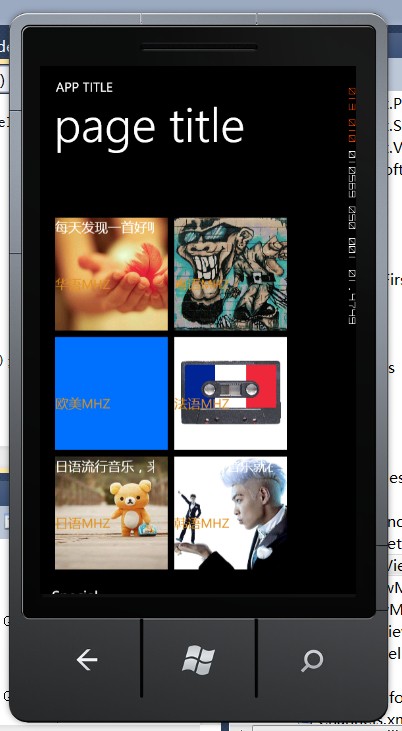
databoundlist的itemtemplate如下:用了一个SlideHubTile,使结果看起来生动一点,SlideHubTile有正面样式和背面样式。
 1   <DataTemplate x:Key="JumpListItemTemplate">
 2                 <Grid >
 3                     <Grid.Resources>
 4                         <DataTemplate x:Key="TitleHub">
 5                             <Grid>
 6                                 <TextBlock Text="{Binding ChannelName}" Foreground="White"/>
 7                             </Grid>
 8                         </DataTemplate>
 9                         <DataTemplate x:Key="BackHub">
10                             <Grid Background="#FF0072FF">
11                                 <Image Source="{Binding ChannelImageSource}"
12                                     Stretch="UniformToFill"/>
13                                 <StackPanel Orientation="Vertical">
14                                     <TextBlock Text="{Binding ChannelIntro}" Foreground="White" Height="85.5" Width="150" HorizontalAlignment="Left"/>
15                                     <TextBlock Height="85.5" Text="{Binding ChannelName}" Width="150" HorizontalAlignment="Left" Margin="0" Foreground="#FFE2901B"/>
16                                 </StackPanel>
17                             </Grid>
18                         </DataTemplate>
19                     </Grid.Resources>
20                     <telerikPRimitives:RadSlideHubTile  Title="{Binding}" TitleTemplate="{StaticResource TitleHub}"  BackContentTemplate="{StaticResource BackHub}" BackContent="{Binding}" Foreground="#FF1BA1E2">
21                         <telerikPrimitives:RadSlideHubTile.Picture>
22                             <Image Source="{Binding ChannelImageSource}"
23                                 Stretch="UniformToFill"/>
24                         </telerikPrimitives:RadSlideHubTile.Picture>
25                     </telerikPrimitives:RadSlideHubTile>
26                 </Grid>
27             </DataTemplate>
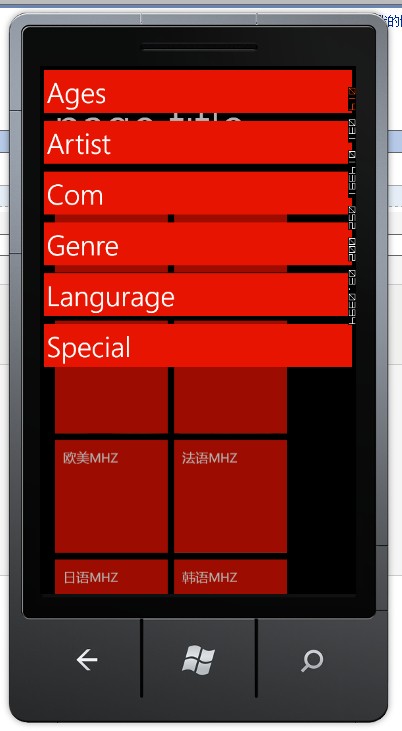
对于组的显示样式,我们可以用原先的模板
 1  <helpers:JumpListFirstItemTemplateSelector x:Key="HeaderTemplateSelector">
 2                 <helpers:JumpListFirstItemTemplateSelector.FirstItemTemplate>
 3                     <DataTemplate>
 4                         <Grid Margin="0,-8,0,12" Width="480">
 5                             <TextBlock FontSize="{StaticResource PhoneFontSizeMedium}" Text="{Binding }" TextWrapping="Wrap"/>
 6                         </Grid>
 7                     </DataTemplate>
 8                 </helpers:JumpListFirstItemTemplateSelector.FirstItemTemplate>
 9                 <helpers:JumpListFirstItemTemplateSelector.StandardItemTemplate>
10                     <DataTemplate>
11                         <Grid Margin="0,20,0,12" Width="480">
12                             <TextBlock  FontSize="{StaticResource PhoneFontSizeMedium}" Text="{Binding }" TextWrapping="Wrap"/>
13                         </Grid>
14                     </DataTemplate>
15                 </helpers:JumpListFirstItemTemplateSelector.StandardItemTemplate>
16 </helpers:JumpListFirstItemTemplateSelector>
最后是DataBoundList的XAML
 1    <telerikData:RadJumpList Margin="18,56,18,-44"
 2                                      GroupDescriptorssource="{Binding ChannelGroupDescriptors}"
 3                                      ItemsSource="{Binding Channels}"
 4                                      ItemTemplate="{StaticResource JumpListItemTemplate}"
 5                                      GroupHeaderTemplateSelector="{StaticResource HeaderTemplateSelector}"
 6                                      x:Name="jumplist"
 7                                      >
 8                 <telerikData:RadJumpList.VirtualizationStrategyDefinition>
 9                     <telerikPrimitives:WrapVirtualizationStrategyDefinition Orientation="Horizontal"/>
10                 </telerikData:RadJumpList.VirtualizationStrategyDefinition>
11                 <i:Interaction.Triggers>
12                     <i:EventTrigger EventName="ItemTap">
13                         <GalaSoft_MvvmLight_Command:EventToCommand Command="{Binding ShowChannleDetials, Mode=OneWay}" PassEventArgsToCommand="True"/>
14                     </i:EventTrigger>
15                 </i:Interaction.Triggers>
16   </telerikData:RadJumpList>
用Command把点选的频道传到VM中去。
效果大致如下,(有些图片出不来,有点没弄明白)
二:具体频道信息
借用前段时间看DEEPDIVEMVVM中学到的,注入一个导航接口,
思路大致就是那个视频中提到的思路,也有源码下载。
 1    public RelayCommand<Telerik.Windows.Controls.ListBoxItemTapEventArgs> ShowChannleDetials
 2         {
 3             get
 4             {
 5                 return showchanneldetials
 6                     ?? (showchanneldetials = new RelayCommand<Telerik.Windows.Controls.ListBoxItemTapEventArgs>(
 7                                           (args) =>
 8                                           {
 9                                               Channel item = (args.Item.Content) as Channel;
10                                               string key = item.ChannelId;
11                                               new MyRxGetMethodService().Get("http://douban.fm/j/mine/playlist?type=n&channel=" + item.ChannelId + "&pb=64&from=mainsite").ObserveOn(Deployment.Current).Subscribe(
12                                                   (result) =>
13                                                   {
14                                                       var songs_string = JToken.Parse(result)["song"].ToString();
15                                                       var MySongs = JsonConvert.DeserializeObject<List<Song>>(songs_string);
16                                                       if (!SimpleIoc.Default.IsRegistered<ChannelDetailViewModel>(key))
17                                                       {
18                                                           SimpleIoc.Default.Register<ChannelDetailViewModel>(
19                                                               () =>
20                                                               {
21                                                                   var mainvm = new ChannelDetailViewModel(MySongs,item.ChannelName,item.ChannelIntro,item.ChannelId,item.ChannelImageSource);
22
23                                                                   return mainvm;
24                                                               }, key);
25                                                       }
26                                                       _navigate.NavigateTo(
27                                                         new Uri(
28                                                             "/ChannelDetail.xaml?" + key,
29                                                             UriKind.Relative));
30
31                                                   });
32
33                                           }));
34             }
35         }
注意new的ChannelDetailViewModel时候注入参数,还有在Ioc中注册
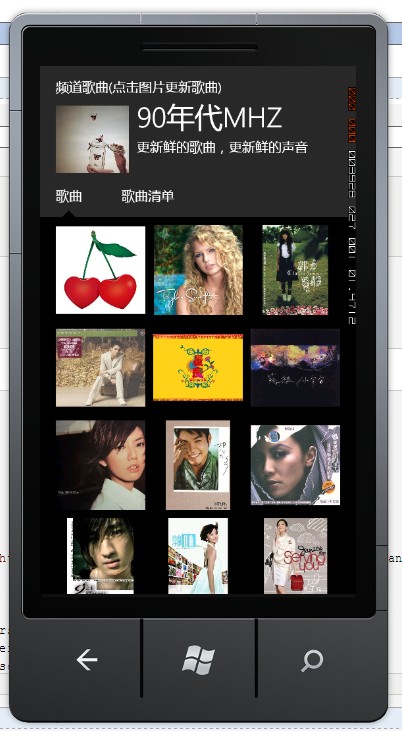
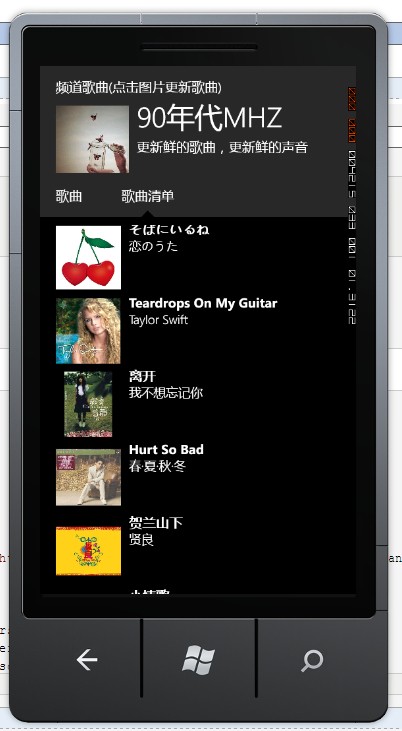
View部分直接使用Telerik的模板:最后效果如下:
要注意在View中也有部分代码:
别忘了在退出这个页面的时候取消掉VM的注册(再点击的过程中会重复注册)
 1  public partial class ChannelDetail : PhoneapplicationPage
 2     {
 3         private string itemUrl;
 4         public ChannelDetail()
 5         {
 6             InitializeComponent();
 7         }
 8         protected override void OnNavigatedTo(System.Windows.Navigation.NavigationEventArgs e)
 9         {
10             if (DataContext == null)
11             {
12                 var url = e.Uri.ToString();
13                  itemUrl = url.Substring(url.IndexOf("?") + 1);
14
15                 if (!SimpleIoc.Default.IsRegistered<ChannelDetailViewModel>(itemUrl))
16                 {
17                     MessageBox.Show("Item not found");
18                     return;
19                 }
20
21                 var vm = SimpleIoc.Default.GetInstance<ChannelDetailViewModel>(itemUrl);
22
23                 DataContext = vm;
24             }
25             base.OnNavigatedTo(e);
26         }
27         protected override void OnNavigatingFrom(System.Windows.Navigation.NavigatingCancelEventArgs e)
28         {
29             if (SimpleIoc.Default.IsRegistered<ChannelDetailViewModel>(itemUrl))
30             {
31                 SimpleIoc.Default.Unregister<ChannelDetailViewModel > (itemUrl);
32             }
33             base.OnNavigatingFrom(e);
34         }
35         private void Option1_Tap(object sender, System.Windows.Input.GestureEventArgs e)
36         {
37             this.Option1Viewer.Visibility = System.Windows.Visibility.Visible;
38             this.Option1Arrow.Visibility = System.Windows.Visibility.Visible;
39             this.Option2Viewer.Visibility = System.Windows.Visibility.Collapsed;
40             this.Option2Arrow.Visibility = System.Windows.Visibility.Collapsed;
41         }
42
43         private void Option2_Tap(object sender, System.Windows.Input.GestureEventArgs e)
44         {
45             this.Option1Viewer.Visibility = System.Windows.Visibility.Collapsed;
46             this.Option1Arrow.Visibility = System.Windows.Visibility.Collapsed;
47             this.Option2Viewer.Visibility = System.Windows.Visibility.Visible;
48             this.Option2Arrow.Visibility = System.Windows.Visibility.Visible;
49         }
50     }
还有点击图片更新歌曲:
使Songs重新指向一片区域,再raise属性改变,最后效果如下:
 1     public RelayCommand RefreshCommand
 2         {
 3             get
 4             {
 5                 return refreshcommand
 6                     ?? (refreshcommand = new RelayCommand(
 7                                           () =>
 8                                           {
 9                                               new MyRxGetMethodService().Get("http://douban.fm/j/mine/playlist?type=n&channel=" + ChannelId + "&pb=64&from=mainsite").ObserveOn(Deployment.Current).Subscribe(
10                                               (result) =>
11                                               {
12                                                   var songs_string = JToken.Parse(result)["song"].ToString();
13                                                   var Songs3 = JsonConvert.DeserializeObject<List<Song>>(songs_string);
14                                                   Song[] tempsongs = new Song[songs.Count];
15                                                   songs.CopyTo(tempsongs);
16                                                   List<Song> songstemp1 = new List<Song>(tempsongs);
17                                                   songstemp1.AddRange(Songs3);
18                                                   Songs = songstemp1;
19                                               });
20                                           }));
21             }
22         }
三.结语
还有些想法还没实现,今天就到这里吧
- 上一篇文章: C#基础---C#如何对Json字符串处理
- 下一篇文章: CSRF攻击与防御
- ASP.NET 2.0高级数据处理之主从数据表
- DataGrid的多行提交
- 使用ASP.NET Atlas开发检测密码强度的自定义
- 我做PHP,但是我要批判下整天唱衰.NET的淫
- asp.net使用httphandler打包多CSS或JS文件以
- 实现把dgv里的数据完整的复制到一张内存表
- 一些通用的代码