
- iOS创建与使用静态库
- iOS里常见的几种信息编码、加密方法简单总结
- Xcode安装插件手误选择了「SkipBundle」后需要重新允许「LoadBundle」的解决方法
- iOS程序破解——ARM汇编基础
- 发布程序后的NSLog批处理
- iOS程序开发中设置UITableView的全屏分隔线的方法(不画线)
- [iOS基础控件-6.11.3]私人通讯录Demo控制器的数据传递、存储
- 得到文字的宽高
- Xcode显示行号
- 【学习笔记】【C语言】函数
- iOS开发中使用UIDynamic来捕捉动画组件的重力行为
- ios版弹珠游戏源码
- ios-获取系统相簿里边的所有照片
- iOS开发日记43-XCode7免证书真机调试
- iOSReact-Native入门指南之HelloWorld
- iOS学习之视图加载过程中会触发的方法(loadView/viewDidLoad/didReceiveMemoryWarning)
- iOS应用中存储用户设置的plist文件的创建与读写教程
- iOS-runtime-objc_setAssociatedObject(关联对象以及传值)
- iOS多线程实现3-GCD
- iOSUITextField限制输入字数
- 小技巧,如何在Label中显示图片
- [iOS基础控件-5.5]代理设计模式(基于”APP列表练习)
- block解析-局部变量
- 创建控制器、控制器加载view过程、控制器view的生命周期、多控制器
- iOS多个storyboard间跳转
- 简单的UIButton按钮动画效果iOS源码
- iOS通过多种方式创建控制器
- UI音乐播放之入门篇AudioSerVicesPlay
- IOS开发之高级功能---远程推送
- 浅析Objective-C字面量
使用GCD实现倒计时效果
作者:佚名 IOS开发编辑:admin 更新时间:2022-07-23
效果如下:
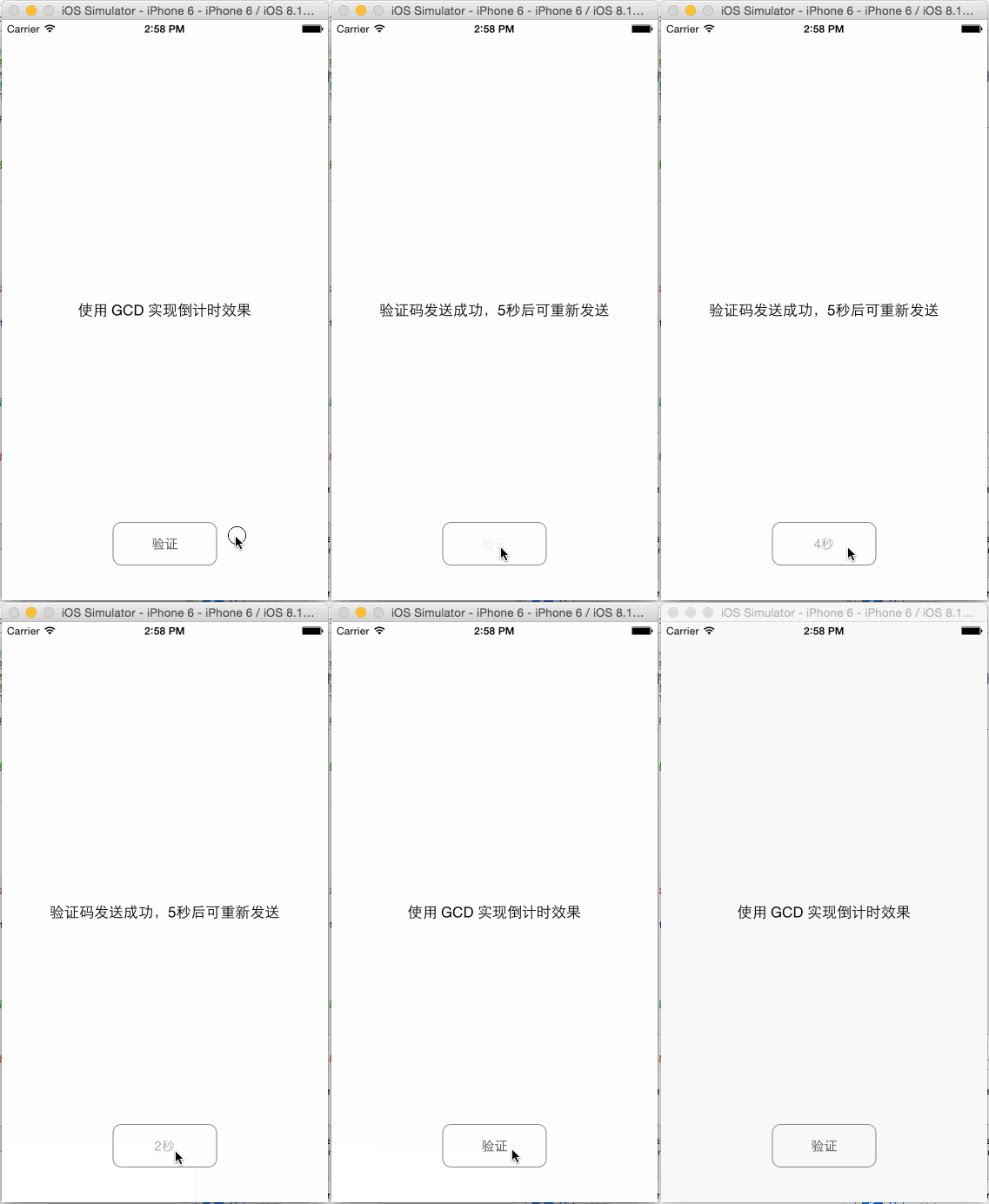
ViewController.h
1 #import <UIKit/UIKit.h>
2
3 @interface ViewController : UIViewController
4 @PRoperty (assign, nonatomic) NSInteger surplusSecond;
5
6 @property (strong, nonatomic) IBOutlet UILabel *lblMessage;
7 @property (strong, nonatomic) IBOutlet UIButton *btnSendCAPTCHA;
8
9 @end
ViewController.m
 1 #import "ViewController.h"
 2
 3 @interface ViewController ()
 4 - (void)layoutUI;
 5 - (void)countDown;
 6 @end
 7
 8 @implementation ViewController
 9 #define kSurplusSecond 5
10
11 - (void)viewDidLoad {
12     [super viewDidLoad];
13
14     [self layoutUI];
15 }
16
17 - (void)didReceiveMemoryWarning {
18     [super didReceiveMemoryWarning];
19     // Dispose of any resources that can be recreated.
20 }
21
22 - (void)layoutUI {
23     _surplusSecond = kSurplusSecond; //剩余秒数;这里指验证码发送完,间隔多少秒才能再次点击「验证」按钮进行发送验证码
24
25     _btnSendCAPTCHA.tintColor = [UIColor darkGrayColor];
26     _btnSendCAPTCHA.layer.masksToBounds = YES;
27     _btnSendCAPTCHA.layer.cornerRadius = 10.0;
28     _btnSendCAPTCHA.layer.borderColor = [UIColor grayColor].CGColor;
29     _btnSendCAPTCHA.layer.borderWidth = 1.0;
30 }
31
32 /**
33  *  倒计时
34  */
35 - (void)countDown {
36     //全局并发队列
37     dispatch_queue_t globalQueue = dispatch_get_global_queue(DISPATCH_QUEUE_PRIORITY_DEFAULT, 0);
38     //主队列;属于串行队列
39     dispatch_queue_t mainQueue = dispatch_get_main_queue();
40
41     //定时循环执行事件
42     //dispatch_source_set_timer 方法值得一提的是最后一个参数(leeway),他告诉系统我们需要计时器触发的精准程度。所有的计时器都不会保证100%精准,这个参数用来告诉系统你希望系统保证精准的努力程度。如果你希望一个计时器每5秒触发一次,并且越准越好,那么你传递0为参数。另外,如果是一个周期性任务,比如检查email,那么你会希望每10分钟检查一次,但是不用那么精准。所以你可以传入60,告诉系统60秒的误差是可接受的。他的意义在于降低资源消耗。
43     dispatch_source_t timer = dispatch_source_create(DISPATCH_SOURCE_TYPE_TIMER, 0, 0, globalQueue);
44     dispatch_source_set_timer(timer, DISPATCH_TIME_NOW, 1.0 * NSEC_PER_SEC, 0.0 * NSEC_PER_SEC);
45     dispatch_source_set_event_handler(timer, ^{ //计时器事件处理器
46         NSLog(@"Event Handler");
47         if (_surplusSecond <= 0) {
48             dispatch_source_cancel(timer); //取消定时循环计时器;使得句柄被调用,即事件被执行
49             dispatch_async(mainQueue, ^{
50                 _btnSendCAPTCHA.enabled = YES;
51                 [_btnSendCAPTCHA setTitle:@"验证" forState:UIControlStateNormal];
52
53                 _lblMessage.text = @"使用 GCD 实现倒计时效果";
54                 _surplusSecond = kSurplusSecond;
55             });
56         } else {
57             _surplusSecond--;
58             dispatch_async(mainQueue, ^{
59                 NSString *btnInfo = [NSString stringWithFormat:@"%ld秒", (long)(_surplusSecond + 1)];
60                 _btnSendCAPTCHA.enabled = NO;
61                 [_btnSendCAPTCHA setTitle:btnInfo forState:UIControlStateDisabled];
62             });
63         }
64     });
65     dispatch_source_set_cancel_handler(timer, ^{ //计时器取消处理器;调用 dispatch_source_cancel 时执行
66         NSLog(@"Cancel Handler");
67     });
68     dispatch_resume(timer);  //恢复定时循环计时器;Dispatch Source 创建完后默认状态是挂起的,需要主动恢复,否则事件不会被传递,也不会被执行
69 }
70
71 - (IBAction)sendCAPTCHA:(id)sender {
72     _lblMessage.text = [NSString stringWithFormat:@"验证码发送成功,%d秒后可重新发送", kSurplusSecond];
73
74     [self countDown];
75 }
76
77 @end
Main.storyboard
 1 <?xml version="1.0" encoding="UTF-8" standalone="no"?>
 2 <document type="com.apple.InterfaceBuilder3.CocoaTouch.Storyboard.XIB" version="3.0" toolsVersion="7706" systemVersion="14E46" targetRuntime="iOS.CocoaTouch" propertyaccessControl="none" useAutolayout="YES" useTraitCollections="YES" initialViewController="vXZ-lx-hvc">
 3     <dependencies>
 4         <deployment identifier="iOS"/>
 5         <plugIn identifier="com.apple.InterfaceBuilder.IBCocoaTouchPlugin" version="7703"/>
 6     </dependencies>
 7     <scenes>
 8         <!--View Controller-->
 9         <scene sceneID="ufC-wZ-h7g">
10             <objects>
11                 <viewController id="vXZ-lx-hvc" customClass="ViewController" sceneMemberID="viewController">
12                     <layoutGuides>
13                         <viewControllerLayoutGuide type="top" id="jyV-Pf-zRb"/>
14                         <viewControllerLayoutGuide type="bottom" id="2fi-mo-0CV"/>
15                     </layoutGuides>
16                     <view key="view" contentMode="scaleToFill" id="kh9-bI-dsS">
17                         <rect key="frame" x="0.0" y="0.0" width="600" height="600"/>
18                         <autoresizingMask key="autoresizingMask" flexibleMaxX="YES" flexibleMaxY="YES"/>
19                         <subviews>
20                             <label opaque="NO" userInteractionEnabled="NO" contentMode="left" horizontalHuggingPriority="251" verticalHuggingPriority="251" text="使用 GCD 实现倒计时效果" lineBreakMode="tailTruncation" baselineAdjustment="alignBaselines" adjustsFontSizeToFit="NO" translatesAutoresizingMaskIntoConstraints="NO" id="1Kh-pV-cfz">
21                                 <rect key="frame" x="200" y="289.5" width="200" height="20.5"/>
22                                 <fontDescription key="fontDescription" type="system" pointSize="17"/>
23                                 <color key="textColor" cocoaTouchSystemColor="darkTextColor"/>
24                                 <nil key="highlightedColor"/>
25                             </label>
26                             <button opaque="NO" contentMode="scaleToFill" contentHorizontalAlignment="center" contentVerticalAlignment="center" buttonType="roundedRect" lineBreakMode="middleTruncation" translatesAutoresizingMaskIntoConstraints="NO" id="rFe-Xb-ZSc">
27                                 <rect key="frame" x="240" y="510" width="120" height="50"/>
28                                 <constraints>
29                                     <constraint firstAttribute="width" constant="120" id="gVH-aT-gen"/>
30                                     <constraint firstAttribute="height" constant="50" id="jJP-Vc-fpy"/>
31                                 </constraints>
32                                 <state key="normal" title="验证">
33                                     <color key="titleShadowColor" white="0.5" alpha="1" colorSpace="calibratedWhite"/>
34                                 </state>
35                                 <connections>
36                                     <action selector="sendCAPTCHA:" destination="vXZ-lx-hvc" eventType="touchUpInside" id="I6T-s9-9H6"/>
37                                 </connections>
38                             </button>
39                         </subviews>
40                         <color key="backgroundColor" white="1" alpha="1" colorSpace="custom" customColorSpace="calibratedWhite"/>
41                         <constraints>
42                             <constraint firstAttribute="centerX" secondItem="rFe-Xb-ZSc" secondAttribute="centerX" id="CoE-CP-eDN"/>
43                             <constraint firstAttribute="centerY" secondItem="1Kh-pV-cfz" secondAttribute="centerY" id="bX4-jS-0xm"/>
44                             <constraint firstAttribute="centerX" secondItem="1Kh-pV-cfz" secondAttribute="centerX" id="mKH-Zw-Utb"/>
45                             <constraint firstItem="2fi-mo-0CV" firstAttribute="top" secondItem="rFe-Xb-ZSc" secondAttribute="bottom" constant="40" id="y3Q-IA-qIO"/>
46                         </constraints>
47                     </view>
48                     <connections>
49                         <outlet property="btnSendCAPTCHA" destination="rFe-Xb-ZSc" id="UFG-TS-ImX"/>
50                         <outlet property="lblMessage" destination="1Kh-pV-cfz" id="gzx-3T-euc"/>
51                     </connections>
52                 </viewController>
53                 <placeholder placeholderIdentifier="IBFirstResponder" id="x5A-6p-PRh" sceneMemberID="firstResponder"/>
54             </objects>
55         </scene>
56     </scenes>
57 </document>
输出结果:
1 2015-08-31 14:40:02.083 KMCountDown[5102:103949] Event Handler
2 2015-08-31 14:40:03.087 KMCountDown[5102:103949] Event Handler
3 2015-08-31 14:40:04.084 KMCountDown[5102:103949] Event Handler
4 2015-08-31 14:40:05.086 KMCountDown[5102:103971] Event Handler
5 2015-08-31 14:40:06.085 KMCountDown[5102:103949] Event Handler
6 2015-08-31 14:40:07.085 KMCountDown[5102:103949] Event Handler
7 2015-08-31 14:40:07.085 KMCountDown[5102:103949] Cancel Handler
- 设计模式中的迭代器模式在Cocoa Touch框架中
- IOS开发--动画篇-->计时定时器
- Objective-C
- iOS9苹果将原http协议改成了https协议的方法
- ios--网页js调用oc代码+传递参数+避免中文参
- iOS阶段学习第24天笔记(Block的介绍)
- iOS8中使用TouchID校验