
·您现在的位置: 云翼网络 >> 文章中心 >> 网站建设 >> 网站建设开发 >> ASP.NET网站开发 >> .NETJson解析到Dictionary,原生代码
- 类的访问修饰符_C#
- Asp.Netalert方法
- 过滤ASP.NET输出HTML中的无用空格
- 如何改变word修订模型下的视图
- ASP.NET实现数据采集
- asp.net 确认对话框与数据验证控件的冲突问题
- 【asp.net】将GridView数据导出Excel
- C#/.net给textbox添加回车事件
- (转)探讨:ASP.NET技术的学习顺序问题
- 类与对象
- 理解IIS7的用户和组
- WisDom.Net 框架设计(八) 持久层
- ADO.NET---ExcuteScalar()方法复习
- 在项目中使用JMail发送邮件
- 互联网时代.NET会渐渐衰落吗?对.NET的思考
- [视频教程]Visual.Studio2005视频教程16.Crystal Report篇之概述
- 判断日期是否到期
- 分享.NET开发中经常用到的十大软件
- C#的界面控件属性修改线程安全问题
- ASP.NET下MVC设计模式的实现
- .NET的堆和栈04,对托管和非托管资源的垃圾回收以及内存分配
- 通过HttpWebRequest 发送 POST 请求实现自动登陆
- GridView动态添加列并判断绑定数据DataTable的列类型控制展示内容
- GridViewRow可以任意位置单击引发事件的方法
- IIS与ASP.NET中的线程池
- asp.net2.0学习历程 菜鸟到中级程序员的飞跃
- .net数据采集程序(网页小偷)点滴心得
- 使用SqlBulkCopy导入数据至MS SQL Server
- 我的一个朋友过来面试引发我要说的一个小话题
- 对asp.net1.1开发模板类的一些修改说明
.NETJson解析到Dictionary,原生代码
作者:佚名 ASP.NET网站开发编辑:admin 更新时间:2022-07-23
之前一直使用微软自带的Json,也一直想试着自己解析下Json玩玩,于是花了一个晚上的时间写了个解析的类,
先说下思路,先从简单的说起:如:标准的JSon格式如:{"Key":"Value1","Key2":1,"Key3":[1,2,3,4],"Key4":{"Test1":"2"},"Key5":[{"A":1,"B":2}]}
我是这样分的把{}的内容看成是一个完整的对象,遇到{}就把他当完整的对象解析(我表达能力可能有问题,不太会表达)
首先是读Key 严格的格式来说 Key必须带双引号,但不排除没带的 所以我做了下判断 如果有双引号 就去掉 ,然后都value值,Value值大致可分三种,
一种就是普通的值 如:字符串、数字、时间,
第二种是 完整的类 ,
第三种就是数组,但数组其实也可以分为两种,一种是普通数组,一种是带子类的数组,
测试了下性能 感觉还行,就发上来了
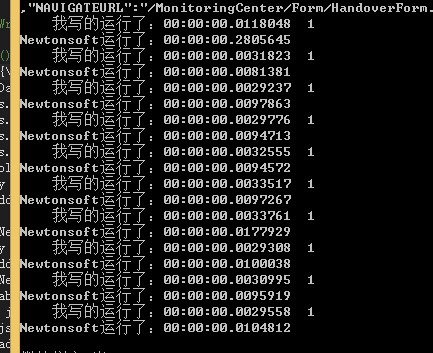
别吐槽哈 小弟也就这两下子
  1 #region 声明
  2 /********************************************************************************************
  3      *  CLR版本:4.0.30319.34011
  4      * .NET版本:V4.0
  5      * 类 名 称:SR
  6      * 命名空间:DotNet
  7      * 创建时间:2014/3/9 19:19:36
  8      * 作    者:中国.NET研究协会 (网站:http://www.dotnet.org.cn  QQ群:45132984)
  9      * 识 别 号:b8f20131-829f-4db0-87a7-d62f8c5ab404
 10 ********************************************************************************************/
 11 /*****************************************本版权权*******************************************
 12  * 本软件遵照GPL协议开放源代码,您可以自由传播和修改,在遵照下面的约束条件的前提下:
 13  *      一. 只要你在每一副本上明显和恰当地出版版权声明,保持此许可证的声明和没有
 14  *          担保的声明完整无损,并和程序一起给每个其他的程序接受者一份许可证的副本,
 15  *          你就可以用任何媒体复制和发布你收到的原始的程序的源代码。你也可以为转让
 16  *          副本的实际行动收取一定费用,但必须事先得到的同意。
 17  *      二. 你可以修改本软件的一个或几个副本或程序的任何部分,以此形成基于程序的作品。
 18  *          只要你同时满足下面的所有条件,你就可以按前面第一款的要求复制和发布这一经
 19  *          过修改的程序或作品。
 20  *      三.只要你遵循一、二条款规定,您就可以自由使用并传播本源代码,
 21  *         但必须原封不动地保留原作者信息。
 22  **********************************************************************************************/
 23 using System;
 24 using System.Collections.Generic;
 25 using System.IO;
 26 using System.Linq;
 27 using System.Text;
 28
 29 namespace DotNet.Json
 30 {
 31     public class JsonReader
 32     {
 33         PRivate TextReader myReader;
 34         private int EndCount = 0;
 35         Dictionary<string,object> myObjDate;
 36         private JsonReader(TextReader reader, int endCount = 0)
 37         {
 38             myObjDate = myObjDate = new Dictionary<string, object>();
 39             myReader = reader;
 40             EndCount = endCount;
 41             int intByte = ReadInt();
 42             while (EndCount != 0 && intByte != -1)
 43             {
 44                 var key = ReadKeyName(intByte);
 45                 var value = ReadValue();
 46                 myObjDate.Add(key, value);
 47                 if (EndCount == 0) { break; }
 48                 intByte = ReadInt();
 49             }
 50         }
 51         public JsonReader(TextReader reader)
 52             : this(reader, 0)
 53         { }
 54         public JsonReader(string value)
 55             : this(new StringReader(value), 0)
 56         { }
 57         private int ReadInt()
 58         {
 59             var intByte = myReader.Read();
 60             if (intByte == 123)
 61             {
 62                 EndCount++;
 63             }
 64             else if (intByte == 125)
 65             {
 66                 EndCount--;
 67             }
 68             return intByte;
 69         }
 70         private string ReadKeyName(int lastChar)
 71         {
 72             StringBuilder strBuilder = new StringBuilder();
 73             var intByte = lastChar;
 74             if (intByte == 123)
 75             {
 76                 intByte = myReader.Read();
 77             }
 78             var lastIntByte = -1;
 79             int endByteInt = -1;
 80             if (intByte == -1)
 81             {
 82                 return null;
 83             }
 84             if (intByte == 34 || intByte == 39)
 85             {
 86                 endByteInt = intByte;
 87                 intByte = myReader.Read();
 88             }
 89             while (intByte != -1)
 90             {
 91                 if (endByteInt != -1)
 92                 {
 93                     if (intByte == endByteInt && lastIntByte != 92)
 94                     {
 95                         ReadInt();
 96                         break;
 97                     }
 98                 }
 99                 else if (intByte == 58)
100                 {
101                     break;
102                 }
103
104                 strBuilder.Append((char)intByte);
105                 intByte = myReader.Read();
106             }
107             return strBuilder.ToString();
108         }
109         private object ReadValue()
110         {
111             var intByte = myReader.Read();
112             if (intByte == 123)
113             {
114                 //函数
115                 var item = new JsonReader(myReader, 1).myObjDate;
116                 ReadInt();
117                 return item;
118             }
119             else if (intByte == 91)
120             {
121                 return ReadValueArray();
122             }
123             else
124             {
125                 return ReadValueString(intByte);
126             }
127         }
128         private string ReadValueArrayString(ref int lastChar)
129         {
130             StringBuilder strBuilder = new StringBuilder();
131             var intByte = lastChar;
132             if (intByte == 123)
133             {
134                 intByte = myReader.Read();
135             }
136             var lastIntByte = -1;
137             int endByteInt = -1;
138             if (intByte == -1)
139             {
140                 return null;
141             }
142             if (intByte == 34 || intByte == 39)
143             {
144                 endByteInt = intByte;
145                 intByte = myReader.Read();
146             }
147             while (intByte != -1)
148             {
149                 lastChar = intByte;
150                 if (endByteInt != -1)
151                 {
152                     if (intByte == endByteInt && lastIntByte != 92)
153                     {
154                         break;
155                     }
156                 }
157                 else if (intByte == 44 || (intByte == 93 && lastIntByte != 92))
158                 {
159                     break;
160                 }
161
162                 strBuilder.Append((char)intByte);
163                 intByte = ReadInt();
164             }
165             return strBuilder.ToString();
166         }
167         private object ReadValueString(int lastChar)
168         {
169             StringBuilder strBuilder = new StringBuilder();
170             var intByte = lastChar;
171             if (intByte == 123)
172             {
173                 intByte = myReader.Read();
174             }
175             var lastIntByte = -1;
176             int endByteInt = -1;
177             if (intByte == -1)
178             {
179                 return null;
180             }
181             if (intByte == 34 || intByte == 39)
182             {
183                 endByteInt = intByte;
184                 intByte = myReader.Read();
185             }
186             while (intByte != -1)
187             {
188                 if (endByteInt != -1)
189                 {
190                     if (intByte == endByteInt && lastIntByte != 92)
191                     {
192                         ReadInt();
193                         break;
194                     }
195                 }
196                 else if (intByte == 44 || (intByte == 125 && lastIntByte != 92))
197                 {
198                     break;
199                 }
200                 strBuilder.Append((char)intByte);
201                 intByte = ReadInt();
202             }
203             return strBuilder.ToString();
204         }
205         private object[] ReadValueArray()
206         {
207             List<object> list = new List<object>();
208             var intByte = myReader.Read();
209             while (intByte != 93)
210             {
211                 if (intByte == 123)
212                 {
213                     var item = new JsonReader(myReader, 1).myObjDate;
214                     list.Add(item);
215                     if (ReadInt() == 93)
216                     {
217                         break;
218                     }
219                 }
220                 else if (intByte == 91)
221                 {
222                     list.Add(ReadValueArray());
223                 }
224                 else
225                 {
226                     list.Add(ReadValueArrayString(ref intByte));
227                     if (intByte == 93) { break; }
228                 }
229                 intByte = myReader.Read();
230             }
231             return list.ToArray();
232         }
233     }
234 }
- 上一篇文章: .net处理页面的抓取数据
- 下一篇文章: 汉字助记码,你会了吗?
- ADO.NETExcuteReader复习
- 在VisualStudio2015Preview中使用Github版本
- 看看吧
- 阿里云系列——6.给你的域名使用CDN加速(详
- 从 PHP 迁移到 ASP.NET
- 如何实现asp.net 2.0的SqlCacheDependency
- c#的DateTime.Now函数详解